
Area and Perimeter of Rectangle 2
Loading the math board and drawing, please wait…
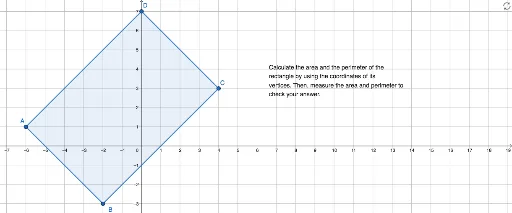
This example demonstrates how to adjust the side lengths of a rectangle to observe changes in its area and perimeter. Key mathematical concepts include the formulas for the area and perimeter of a rectangle. Using GeoGebra commands such as Point and Polygon, a dynamic rectangle can be constructed, and the effects of changing side lengths on area and perimeter can be observed. Suitable for middle school and above students to learn geometric construction and dynamic changes.
GeoGebra Commands & Parameters
Point(yAxis) → DPolygon(A, B, C, D) → q1, a, b, c, d
AI Drawing Prompt Reference
Draw a dynamic rectangle on a coordinate plane with one vertex on the y-axiscars, and the other three vertices connected in order to form a closed shape. The side lengths should be adjustable to observe changes in area and perimeter. Clearly show the four sides and vertices, and emphasize the relationship between area and perimeter. Start by placing a point on the y-axis as the first vertex, then determine the other three vertices, and finally connect all vertices with straight segments to form the rectangle.
The prompt above was compiled from the original drawing commands and is for reference only.