
Area and Circumference of the Unit Circle
Loading the math board and drawing, please wait…
In collections
Area and circumference of a circle
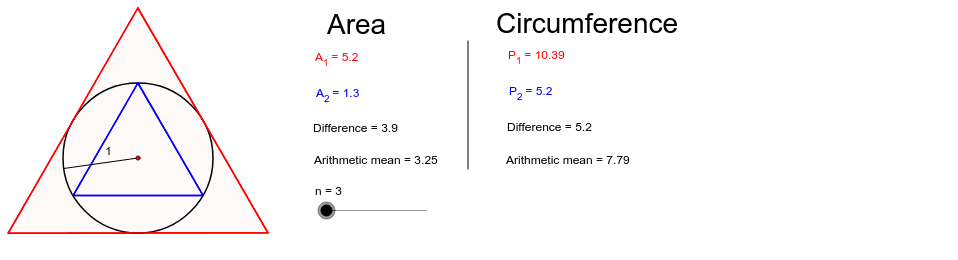
This GeoGebra example demonstrates the approximation of the area and circumference of the unit circle using regular polygons with an increasing number of edges. It visually illustrates how polygonal approximations converge to the true values. Key mathematical concepts include circle geometry, properties of regular polygons, limits, and Riemann sums. The construction employs commands such as Circle to draw the circle, Point and Intersect to define points, Polygon to create polygons, and Ray, Segment, and Median for auxiliary constructions. Objects like poly1 and poly2 represent different polygonal approximations, while text objects display the calculated results. This example is suitable for high school or early college mathematics education, particularly in introducing concepts of limits, integration, or geometric properties of circles.
GeoGebra Commands & Parameters
Circle(A, a) → cPoint(c) → BCircle(B, s) → dIntersect(c, d) → C, D, ,Polygon(B, C, n) → poly1, b, c_1, e, ERay(A, B) → iRay(A, C) → fCircle(A, r) → gIntersect(g, i) → F,Intersect(g, f) → G,Polygon(F, G, n) → poly2, h, f_1, j, HPoint(c) → ISegment(A, I) → kMedian({poly1, poly2}) → oSegment(A_2, C_2) → t_2
AI Drawing Prompt Reference
Draw a unit circle and approximate its area and circumference using regular polygons. First, draw the circle. Then, create two regular polygons with different numbers of sides. Connect the center to the vertices to show the comparison between the polygons and the circle. Finally, label the number of sides and approximate values to illustrate how the polygons approach the circle as the number of sides increases.
The prompt above was compiled from the original drawing commands and is for reference only.