
Are All Rectangles Similar? by Tyler Haslam
Loading the math board and drawing, please wait…
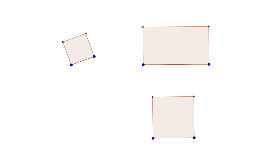
This example explores whether all rectangles are similar by demonstrating geometric properties, proportionality, statistical characteristics, circumcircles, prisms, and line segments. It uses GeoGebra commands like Segment, Circle, OrthogonalLine, Intersect, Polygon, and Point for construction, making it suitable for high school mathematics education on similarity and geometric transformations.
GeoGebra Commands & Parameters
Segment(A, B) → aCircle(A, B) → cCircle(B, A) → dOrthogonalLine(A, a) → bIntersect(c, b, 2) → CCircle(C, A) → eIntersect(d, e, 2) → DPolygon(A, B, D, C) → poly1, a_1, b_1, d_1, c_1Segment(E, F) → fOrthogonalLine(E, f) → gOrthogonalLine(F, f) → hPoint(g) → GOrthogonalLine(G, g) → iIntersect(h, i) → HPolygon(E, G, H, F) → poly2, e_1, g_1, h_1, f_1Segment(A_1, B_1) → a_3Circle(A_1, B_1) → c_3Circle(B_1, A_1) → d_3OrthogonalLine(A_1, a_3) → b_3Intersect(c_3, b_3, 2) → C_1Circle(C_1, A_1) → e_2Intersect(d_3, e_2, 2) → D_1Polygon(A_1, B_1, D_1, C_1) → poly1_1, a_2, b_2, d_2, c_2
AI Drawing Prompt Reference
Draw two rectangles to explore similarity. Start with a segment as a side; draw circles centered at each endpoint with the segment as radius. Through one endpoint, draw a perpendicular line to the segment, intersecting the first circle at a point. Using that point as center, draw a circle with the original segment length, intersecting the second circle at another point. Connect the four points to form the first rectangle. Then, using another segment as a base, draw perpendiculars at both endpoints. Pick a point on one perpendicular, draw a line through it perpendicular to that perpendicular, intersecting the other perpendicular. Connect the four points to form the second rectangle. Finally, repeat the first rectangle's construction to get a third rectangle.
The prompt above was compiled from the original drawing commands and is for reference only.