
Arc Length and Area of a Sector
Loading the math board and drawing, please wait…
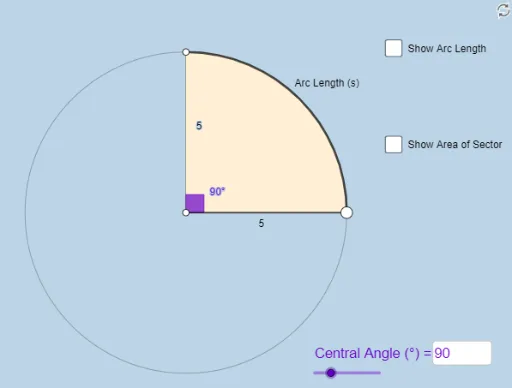
This example demonstrates how to dynamically explore the calculation of arc length and sector area in a circle. Core mathematical concepts include circles, angles, arc length formulas, and sector area formulas. The construction utilizes GeoGebra commands and objects such as Point, Ray, Circle, Segment, Rotate, Angle, CircleArc, CircleSector, Textfield, Area, and Circumference. Suitable for middle school mathematics education to help students visually understand and master related geometric calculations.
GeoGebra Commands & Parameters
Point(yAxis) → ARay(A, (1, 0)) → hPoint(h) → BCircle(A, B) → cSegment(A, B) → fRotate(B, (a * π / 180), A) → B'Angle(B, A, B') → αCircleArc(A, B, B') → dSegment(A, B') → gCircleSector(A, B, B') → eTextfield(a) → InputBox1Area(c) → lCircumference(c) → m
AI Drawing Prompt Reference
Draw a circle with a horizontal line segment from the center to the right, and another line segment from the center at angle α to the horizontal, forming a sector. Show the arc, sides, and angle of the sector, labeling the central angle α in degrees. Also calculate and display the area of the sector and the circumference of the circle, placing the angle value α and calculation results nearby.
The prompt above was compiled from the original drawing commands and is for reference only.