
Approximating a Double Integral with Prisms
Loading the math board and drawing, please wait…
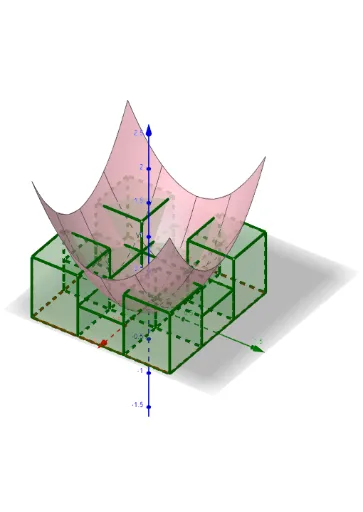
This example demonstrates approximating a double integral over a rectangular region using prisms. It covers the concept of double integrals and utilizes GeoGebra commands such as Polygon and Sequence. Suitable for university calculus courses.
GeoGebra Commands & Parameters
Polygon(P_1, P_2, P_4, P_3) → q1, p_1, p_2, p_4, p_3Textfield(a) → InputBox1Textfield(b) → InputBox2Textfield(c) → InputBox3Textfield(d) → InputBox4Textfield(f) → InputBox5Sequence(Sequence[Prism[Polygon[(a + (i * d_x), c + (j * d_y)), (a + ((i + 1) * d_x), c + (j * d_y)), (a + ((i + 1) * d_x), c + ((j + 1) * d_y)), (a + (i * d_x), c + ((j + 1) * d_y)), (a + (i * d_x), c + (j * d_y))], f((a + (i * d_x) + a + ((i + 1) * d_x)) / 2, (c + (j * d_y) + c + ((j + 1) * d_y)) / 2)], i, 0, n - 1], j, 0, n - 1) → L_1
AI Drawing Prompt Reference
Visualize approximating a double integral over a rectangular region using prisms. Start by drawing the base of the rectangle, then generate multiple prisms within the rectangle based on given parameters. Each prism has a rectangular base as a part of the larger rectangle and a height determined by a function value, creating a stack of prisms that visually approximates the value of the double integral.
The prompt above was compiled from the original drawing commands and is for reference only.