
Applications of Geometric Constructions: Baseball Field and Playground Model
Loading the math board and drawing, please wait…
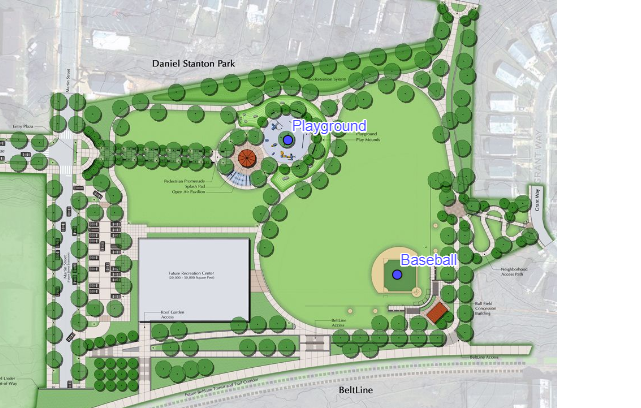
This GeoGebra example demonstrates how to apply geometric construction tools to model real-world scenes, specifically a baseball field (Baseball) and a playground (Playground), within a planar coordinate environment. Core mathematical concepts include plane geometric construction, coordinate representation of points A and B, proportional scaling, and geometric modeling of practical scenarios. The construction uses GeoGebra objects A, B, pic1, Playground, and Baseball: point tools create A and B; the image object pic1 serves as a background or reference; Playground and Baseball objects define the scene outlines; object properties such as color, opacity, and layering are adjusted for clear visualization. Suitable for middle school and high school geometry instruction, classroom demonstrations, and independent student exploration, helping learners connect abstract geometric constructions with real-world contexts.
GeoGebra Commands & Parameters
Point A(-4.177999999999999, -2.6800000000000015)Point B(5.873200000000001, -2.6800000000000015)Point Playground(1.19, 3.68)Point Baseball(3.09, 1.34)
AI Drawing Prompt Reference
Construct a geometric scene model of a baseball field and playground in a planar coordinate system. Begin by establishing two reference points aligned horizontally across the left and right sides. Then mark a characteristic point for the playground in the upper region and another for the baseball field in the middle-right area. Using these key points, draw the outline polygons of both fields with proportional scaling. Adjust colors, opacity, and layering so the background reference image and foreground field outlines appear clearly separated, creating a geometric modeling effect that connects abstract constructions with real-world contexts.
The prompt above was compiled from the original drawing commands and is for reference only.