
Applications of Derivatives: Tangent, Slope, and Geometric Constructions
Loading the math board and drawing, please wait…
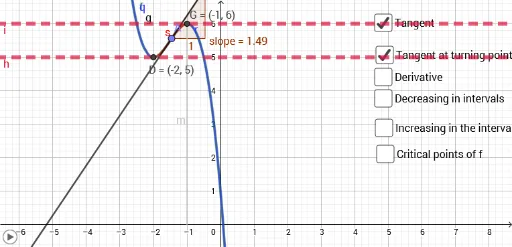
① This GeoGebra example dynamically illustrates the geometric meaning of derivatives by showing the tangent line, its slope, and related constructions (perpendicular lines, intersections, rays, and segments) on a function graph. ② Core mathematical concepts include the derivative as the slope of the tangent, the relationship between a function and its derivative, and using derivatives to analyze local behavior (monotonicity, extrema), while also incorporating equilateral triangles, piecewise functions, and conic sections to show broader applications. ③ Construction highlights: Based on the summary, the example uses the Derivative command to generate f', Point to place A on the curve, Tangent and Slope to draw and measure the tangent, OrthogonalLine for perpendiculars, Intersect for crossing points, and Ray/Segment for additional geometric elements, resulting in a rich set of objects (f, f', A, g, a, b, slope, h, i, c, j, B, C, k, D, l, m, E, F, n, p, d, e, q, r, s, G, o). ④ Suitable for high school or early college calculus students, this interactive model is ideal for classroom demonstrations or self-study to explore the dynamic link between derivatives and geometry, and serves as a template for creating calculus visualizations.
GeoGebra Commands & Parameters
Derivative(f) → f'Point(f) → ATangent(A, f) → gSlope(g) → slopeTangent((-2, 5), f) → hTangent((-1, 6), f) → iOrthogonalLine((-2, 5), y = 0) → jIntersect(j, xAxis) → BPoint(xAxis) → CRay(B, C) → kIntersect(f, h, 1) → DSegment(D, B) → lSegment((-1, 6), (-1, 0)) → mIntersect(f', m, 1) → EPoint(xAxis) → FRay(E, F) → nSegment(B, E) → pIntersect(f, r, (-1, 6)) → G