
Apparent Wind and Boat Speed: Vector Angle Construction (ApparentWind3)
Loading the math board and drawing, please wait…
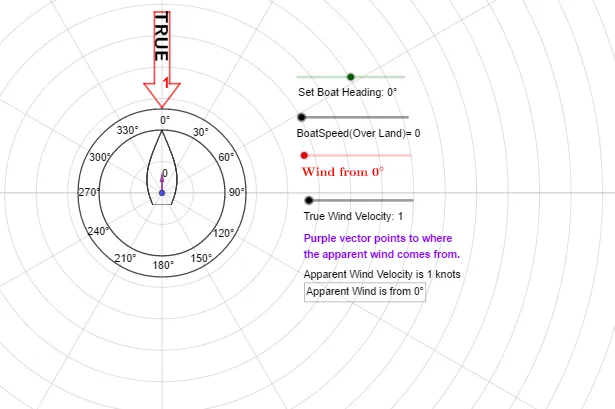
This GeoGebra example demonstrates, in a 2D geometric setting, how changing wind direction affects the relationship between true/apparent wind and the boat’s speed by constructing and transforming velocity vectors. It centers on core ideas of planar vectors (addition/decomposition and direction handling), trigonometry (e.g., sine-based relations for angles or components), and geometric interpretation of speed and angle constraints. Construction-wise, it uses commands such as If and Rotate to handle conditional configurations and rotate the reference geometry, Circle to build speed/wind-related circles and obtain intersection points, and then represents the relevant quantities via generated objects like the wind/velocity vector W_{vel}, the boat velocity v, and labeled angle parameters such as TrueWindDirection and α. Supporting points and derived objects (e.g., O, A, V, G/H, and primed variants like pic1', G') help visualize multiple states and the resulting angle/velocity geometry. Suitable for upper secondary students and early university learners for vector-trigonometry visualization, physics-inspired modeling of wind/boat motion, and hands-on practice with geometric construction in GeoGebra.
GeoGebra Commands & Parameters
If(α < 0, α + 360°, α) → aRotate(pic1, (-α)) → pic1'Circle(O, 3) → cCircle(O, C) → dRotate(D, (-a)) → D'Rotate(G, (-TrueWindDirection)) → G'Rotate(pic3, 180°) → pic3'Rotate(pic3', (-TrueWindDirection)) → pic3''If(atan2d(x(v), y(v)) < 0, atan2d(x(v), y(v)) + 360°, atan2d(x(v), y(v))) → γ
AI Drawing Prompt Reference
Create a 2D geometry diagram showing how wind direction changes the relation between true/apparent wind and a boat’s speed using vector directions and angles. Start by normalizing the given angle α into the 0–360° range, then rotate a reference configuration by −α to obtain a primed state. Draw two circles centered at the origin: one with radius 3, and another using a radius determined by a second reference point, so their intersections/positions support the velocity–wind construction. Rotate the relevant points associated with the true wind direction by −TrueWindDirection, and rotate another secondary reference configuration by 180° to display paired states. Apply a further rotation of that secondary configuration by −TrueWindDirection to align it with the true-wind scenario. Finally, determine the direction angle γ from the x/y components of the velocity vector and indicate the resulting direction/angle in the final state.
The prompt above was compiled from the original drawing commands and is for reference only.