
Animation 138: A Comprehensive Demonstration of Geometric Objects and Transforma
Loading the math board and drawing, please wait…
In collections
Congruence (CO) Cluster
Geometry Review
CCSS High School: Geometry (Congruence) Volume 1
CCSS High School: Geometry (Congruence) Volume 1
CCSS High School: Geometry (Congruence) Volume 1
Unit 5: Triangle Congruence
Triangle Congruence Theorems 1
Triangle Congruence Book 1
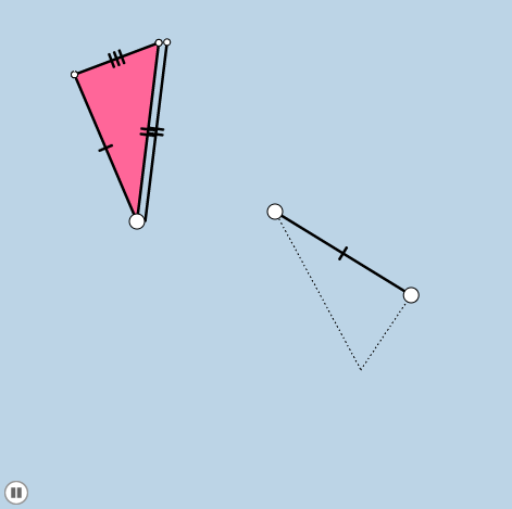
This GeoGebra example, titled 'Animation 138', is a dynamic animation driven by sliders that showcases a composite of various geometric objects and their transformations. The core mathematical concepts include circles, polygons, segments, angles, vectors, dilation (scaling), translation, rotation, and reflection, alongside statistical and calculus topics such as upper and lower sums (Riemann sums), binomial distribution, frequency distribution, and real numbers. The construction uses commands like Circle, Intersect, Segment, Polygon, Point, Line, Angle, Dilate, Vector, Translate, Rotate, Mirror, and Ray, creating numerous objects (a, b, c, A, d, e, B, C, f, g, k, F, G, h, i, poly1, etc.) that interact through the animation. It is suitable for high school and above students to explore geometric transformations, dynamic constructions, and the relationships between mathematical objects, and serves as an excellent teaching tool for demonstrating complex constructions and animations in GeoGebra.
GeoGebra Commands & Parameters
Circle(A, a) → dIntersect(d, e) → B, CCircle(C, b) → fSegment(A, C) → gCircle(A, c) → kIntersect(k, f) → F, G, ,Segment(C, F) → hSegment(F, A) → iPolygon(A, C, F) → poly1, f_1, a_1, c_1Circle(D, i) → pPoint(p) → ESegment(D, E) → nCircle(D, g) → qCircle(E, h) → rIntersect(q, r, 2) → HSegment(D, H) → sSegment(H, E) → tLine(A, n) → g_1Point(g_1) → IAngle(I, A, F) → αDilate(A, If[0 < o ≤ 1, 1 - o, 0], D) → A'Vector(A, A') → uTranslate(F, u) → F'Translate(A, u) → A'_1Segment(F', A'_1) → i'Rotate(F', If[1 < o ≤ 2, ((-(o - 1)) * α), (-α)], D) → F''Rotate(A'_1, If[1 < o ≤ 2, ((-(o - 1)) * α), (-α)], D) → JSegment(F'', J) → i''Dilate(A, If[2 < o ≤ 3, 3 - o, 0], D) → A'_2Vector(A, A'_2) → vTranslate(A, v) → A'_3Translate(C, v) → C'Segment(A'_3, C') → g'Line(D, g) → h_1Point(h_1) → KAngle(H, D, K) → βRotate(A'_3, If[3 < o ≤ 4, ((-(o - 3)) * β), (-β)], D) → LRotate(C', If[3 < o ≤ 4, ((-(o - 3)) * β), (-β)], D) → C''Segment(L, C'') → g''Line(C, t) → i_1Point(i_1) → MAngle(M, C, F) → γDilate(C, If[4 < o ≤ 5, 5 - o, 0], C'') → C'_1Vector(C, C'_1) → wTranslate(C, w) → C'_2Translate(F, w) → F'_1Segment(C'_2, F'_1) → h'Rotate(C'_2, If[5 < o ≤ 6, ((-(o - 5)) * γ), (-γ)], C'') → NRotate(F'_1, If[5 < o ≤ 6, ((-(o - 5)) * γ), (-γ)], C'') → OSegment(N, O) → h''Polygon(D, C'', E) → poly2, e_1, d_1, c''Dilate(A, If[(6 * 0.5) < o ≤ 7.5, 7.5 - o, 0], D) → A'_4Vector(A, A'_4) → u_1Translate(A, u_1) → A'_5Translate(C, u_1) → C'_3Translate(F, u_1) → F'_2Polygon(A'_5, C'_3, F'_2) → poly1', f'_2, a'_5, c'_3Rotate(A'_5, If[7.5 < o ≤ 8.5, ((-(o - 7.5)) * γ), (-γ)], D) → PRotate(C'_3, If[7.5 < o ≤ 8.5, ((-(o - 7.5)) * γ), (-γ)], D) → QRotate(F'_2, If[7.5 < o ≤ 8.5, ((-(o - 7.5)) * γ), (-γ)], D) → RPolygon(P, Q, R) → poly1'', r_1, p_1, q_1Line(F, C) → j_1Mirror(A, j_1) → A'_6Mirror(C, j_1) → C'_4Mirror(F, j_1) → F'_3Polygon(A'_6, C'_4, F'_3) → poly1'_1, f'_3, a'_6, c'_4Point(j_1) → SPoint(j_1) → TRay(C'_4, T) → k_1Ray(F'_3, S) → l_1Segment(A'_6, F'_3) → m_1Segment(A'_6, C'_4) → n_1
AI Drawing Prompt Reference
Create a dynamic geometric illustration showing a triangle constructed from intersecting circles, then transformed through scaling, translation, rotation, and reflection. Start with two circles intersecting at two points, forming a triangle with a third point. Add more circles centered at triangle vertices to create additional intersection points, forming a base triangle. From an external point, draw segments and circles to build auxiliary lines and angles. Using a slider-controlled parameter, sequentially apply dilation, translation, rotation, and reflection to the triangle, each step generating a new position with connecting segments. Include angle markers and auxiliary lines to show relationships. The final image is a composite of multiple transformed triangles, demonstrating geometric transformations in a single animated scene.
The prompt above was compiled from the original drawing commands and is for reference only.