
Animation 123: Dynamic Demonstration of Geometry and Probability
Loading the math board and drawing, please wait…
In collections
Congruence (CO) Cluster
Congruence (Vol 2)
CCSS High School: Geometry (Congruence) Volume 2
CCSS High School: Geometry (Congruence) Volume 2
CCSS High School: Geometry (Congruence) Volume 2
Geometry (Congruence) Volume 2
CCSS High School: Geometry (Congruence) Volume 2
CCSS High School: Geometry (Congruence) Volume 2
CCSS High School: Geometry (Congruence) Volume 2
CCSS High School: Geometry (Congruence) Volume 2
CCSS High School: Geometry (Congruence) Volume 2
CCSS High School: Geometry (Congruence) Volume 2
CCSS High School: Geometry (Congruence) Volume 2
Gail LeBlancCCSS High School: Geometry (Congruence) Volume 2
CCSS High School: Geometry (Congruence) Volume 2
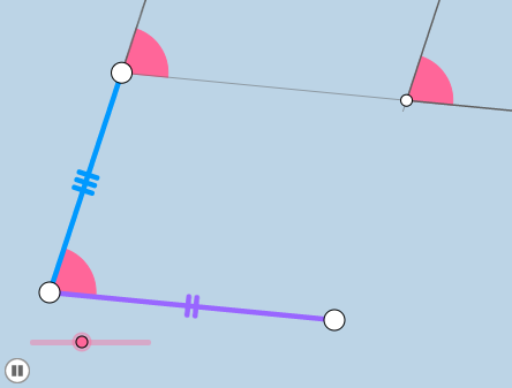
This example demonstrates the properties of parallelograms, isosceles triangles, and other geometric figures through dynamic animations, while integrating the hypergeometric distribution for visualization. Key mathematical concepts include geometric construction, transformations, and probability. The construction involves GeoGebra commands such as Rotate, Angle, Circle, and others. Suitable for high school students or college undergraduates for learning and practicing geometry and probability.
GeoGebra Commands & Parameters
Rotate(B, a°, A) → B'Angle(B, A, B') → αRay(A, B) → fRay(A, B') → gLine(B, g) → hPoint(g) → CLine(C, f) → iIntersect(h, i) → DSegment(C, D) → jSegment(A, B) → kSegment(B, D) → lSegment(A, C) → mMin(m, k) → bCircle(C, (0.2 * b)) → dCircle(A, (0.2 * b)) → eCircle(B, (0.2 * b)) → pCircle(D, (0.2 * b)) → cIntersect(e, k, 1) → EIntersect(e, m, 1) → FIntersect(p, k, 1) → GIntersect(p, l, 1) → HIntersect(d, g, 2) → IRay(C, I) → qIntersect(c, h, 2) → JRay(D, J) → rIntersect(c, i, 2) → KRay(D, K) → sDilate(A, If[0 < o ≤ 1, 1 - o, 0], B) → A'Segment(A, A') → tRotate(E, If[1 < o ≤ 2, ((o - 1) * α), α], A) → E'CircleSector(A, E, E') → c_1Dilate(A, If[2 < o ≤ 3, 3 - o, 0], C) → A'_1Vector(A, A'_1) → uTranslate(c_1, u) → d_1Segment(A, A'_1) → f_1Dilate(C, If[3 < o ≤ 4, 4 - o, 0], D) → C'Vector(C, C') → vTranslate(d_1, v) → e_1Segment(C, C') → g_1Dilate(D, If[4 < o ≤ 5, 5 - o, 0], B) → D'Segment(D, D') → h_1Polygon(A, B, D, C) → poly1, a_1, b_1, d_2, c_2Dilate(A, If[5.5 < o ≤ 6.5, 6.5 - o, 0], C) → A'_2Vector(A, A'_2) → wTranslate(A, w) → A'_3Translate(A', w) → A''Segment(A'_3, A'') → t'Dilate(A, If[6.5 < o ≤ 7.5, 7.5 - o, 0], B) → A'_4Vector(A, A'_4) → u_1Translate(A, u_1) → A'_5Translate(A'_1, u_1) → LSegment(A'_5, L) → i_1
AI Drawing Prompt Reference
This prompt describes a dynamic geometric figure that demonstrates the properties of parallelograms, isosceles triangles, and other geometric shapes. The figure includes elements such as rotation, angle calculation, ray generation, line intersection, and circle drawing. Through scaling and transformation, the figure showcases geometric construction and probability visualization. The construction order begins with basic geometric elements and gradually introduces transformations and circles, ultimately forming a dynamic demonstration.
The prompt above was compiled from the original drawing commands and is for reference only.