
Animated Sine Curve Demonstration
Loading the math board and drawing, please wait…
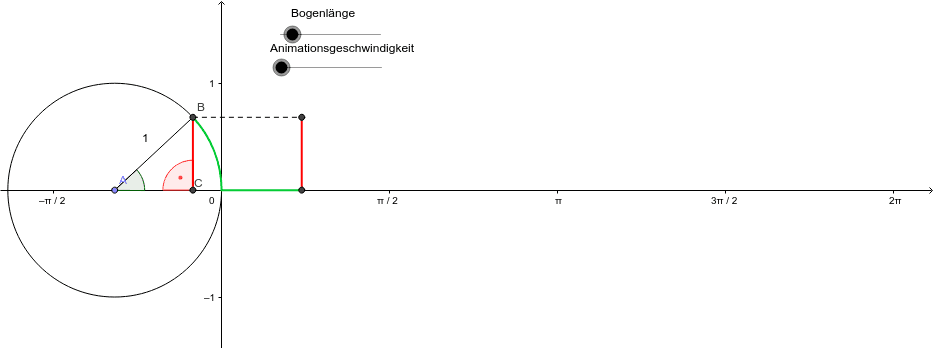
① This example visually demonstrates how a sine curve is generated by projecting the y-coordinate of a point rotating on the unit circle as the angle changes. ② Core mathematical concepts include trigonometric functions (sine), angle and radian measure, the unit circle, periodicity, and the relationship between geometric transformations and function graphs. ③ Construction details: Using GeoGebra commands such as Point, Circle, Rotate, Angle, Line, Intersect, Segment, and CircleArc, the construction involves objects A, c, B, a, B', α, b, C, d, e, Q, f, g, h, R, i, j, and β. The point B is rotated to create B', with angles α and β controlling the dynamic motion, and the locus of point Q traces the sine curve. ④ Suitable for high school or early college students learning the connection between trigonometric functions and the unit circle, and useful for teachers as a classroom demonstration or for students' independent exploration to understand periodicity and phase shifts of the sine function.
GeoGebra Commands & Parameters
Point(xAxis) → ACircle(A, 1) → cPoint(c) → BRotate(B, a, A) → B'Angle(B, A, B') → αLine(B', yAxis) → bIntersect(b, xAxis) → CSegment(B', C) → dSegment(B', A) → eSegment(B', Q) → gCircleArc(A, B, B') → hSegment(B, R) → iSegment(Q, R) → jAngle(B', C, A) → β
AI Drawing Prompt Reference
Create a dynamic demonstration of sine curve generation. Draw a unit circle centered at the origin. Place a point on the circle that rotates around the center, with the rotation angle controlled by a slider. From this rotating point, drop a perpendicular to the y-axis, and mark its intersection with the x-axis. Connect the rotating point to this intersection with a segment, and also connect it to the center. Show the arc of the circle swept by the rotation. Introduce another point whose x-coordinate equals the rotation angle (in radians) and whose y-coordinate equals the rotating point's y-coordinate; trace its path to form the sine curve. Connect the rotating point to this traced point with a segment, and display the relevant angle markers.
The prompt above was compiled from the original drawing commands and is for reference only.