
Angles on Parallel Lines by Blake Churton
Loading the math board and drawing, please wait…
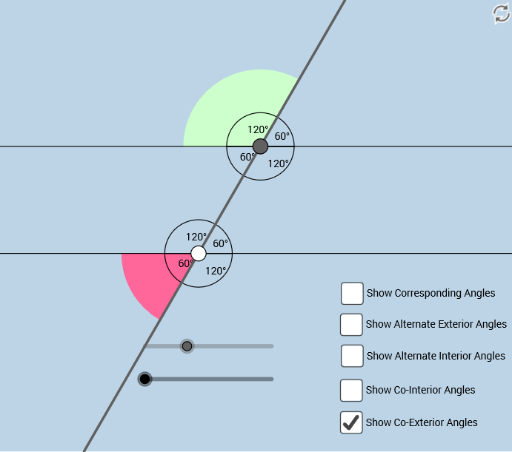
This example demonstrates angles on parallel lines. Key mathematical concepts include parallel lines, corresponding angles, alternate interior angles, and same-side interior angles. Using GeoGebra commands such as Point, Intersect, Angle, and Line, these angles are constructed. Suitable for middle and high school students studying geometry.
GeoGebra Commands & Parameters
Point(f) → ACircle(A, 2) → cIntersect(c, f, 2) → BRotate(B, (a * π / 180), A) → B'Rotate(f, (b * π / 180), A) → f'Intersect(c, f', 2) → FRotate(F, (a * π / 180), A) → F'Angle(F, A, F') → αLine(A, F') → gIntersect(c, g, 1) → CRay(A, F') → hRay(A, C) → iIntersect(c, f', 1) → DRay(A, F) → jRay(A, C) → kRay(A, D) → lPoint(l) → EPoint(h) → GPoint(k) → HPoint(j) → ILine(G, j) → mCircle(G, 1) → dIntersect(d, m) → J, KIntersect(d, h) → L, MRay(G, K) → nRay(G, J) → pPoint(n) → OPoint(p) → PIntersect(d, h, 2) → QRay(G, Q) → qSegment(A, G) → rPoint(q) → NCircle(G, 1.5) → c_1Circle(A, 1.5) → d_1Intersect(c_1, n, 1) → RIntersect(c_1, q, 1) → SIntersect(c_1, p, 1) → TIntersect(c_1, r, 1) → UIntersect(d_1, j, 1) → VIntersect(d_1, r, 1) → WIntersect(d_1, l) → Z,Intersect(d_1, k, 1) → A_1CircleSector(G, R, S) → e_1CircleSector(G, S, T) → f_1CircleSector(G, T, U) → g_1CircleSector(G, U, R) → h_1CircleSector(A, V, W) → k_1CircleSector(A, W, Z) → p_1CircleSector(A, Z, A_1) → q_1CircleSector(A, A_1, V) → r_1Angle(n, q) → βAngle(j, r) → γAngle(q, p) → δAngle(r, l) → εAngle(A, G, O) → ζAngle(P, G, A) → ηAngle(H, A, I) → θAngle(E, A, H) → ι