
Angle-Side-Angle (ASA) Triangle Construction
Loading the math board and drawing, please wait…
In collections
Triangle Congruence Activity
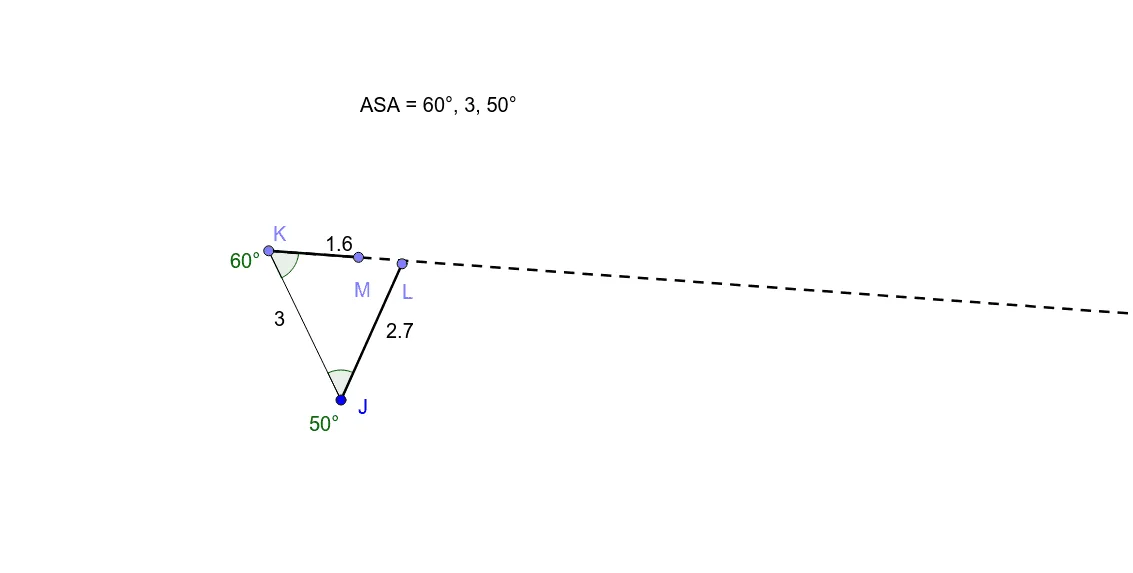
This GeoGebra example demonstrates how to construct a triangle uniquely from the Angle-Side-Angle (ASA) condition, which is a fundamental triangle congruence criterion. The core mathematical concept is that given two angles and the included side, the triangle is uniquely determined. The construction uses commands such as Point to define initial vertices, Rotate to create rays at specified angles, Ray and Intersect to find the third vertex, Segment to draw sides, Angle to label the given angles, and If to handle conditional cases. Key objects include J, K, K', n, L, J', m, S, M, E, l, γ, δ, p, poly3, q, and text3, where poly3 represents the constructed triangle polygon and text3 may display angle or side measurements. This example is suitable for middle school or high school geometry classes, serving as an interactive tool to visualize why ASA guarantees congruence and to explore how changing the given angles or side length affects the resulting triangle.
GeoGebra Commands & Parameters
Point(Circle[J, 3]) → KRotate(K, -50°, J) → K'Ray(J, K') → nPoint(n) → LRotate(J, 60°, K) → J'Ray(K, J') → mIntersect(m, n) → SPoint(m) → MSegment(J, K) → lAngle(J, K, J') → γAngle(K', J, K) → δSegment(J, L) → pIf(Distance[M, L] < 0.05, Polygon[J, K, S]) → poly3Segment(K, M) → q