
Angle Relationships Multi‑Step Problem (7.G.2.5)
Loading the math board and drawing, please wait…
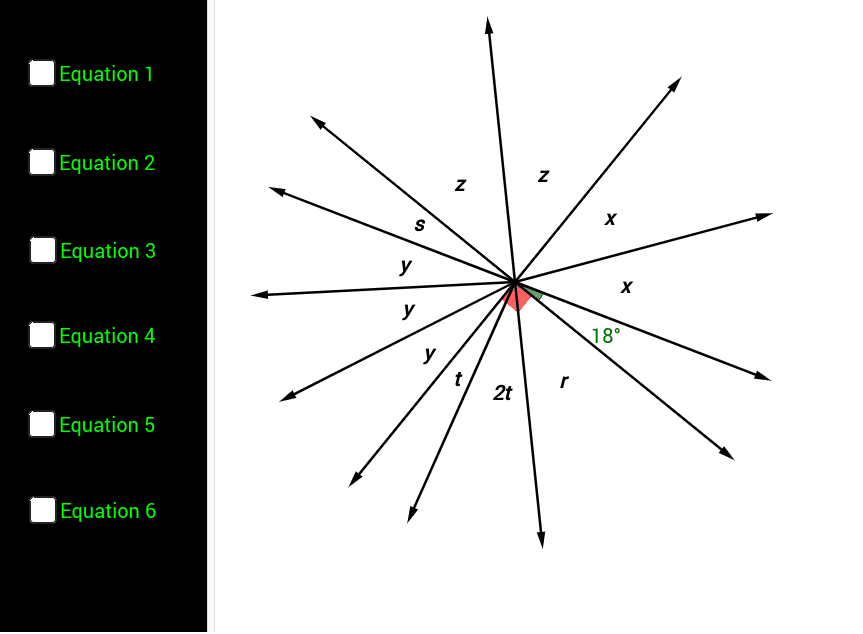
① This example demonstrates how to apply supplementary, complementary, vertical, and adjacent angle properties to set up and solve equations for unknown angles in a multi‑step configuration of intersecting lines and rays. ② Core math concepts: angle classification and relationships, linear equation formulation and solving, multi‑step geometric reasoning. ③ Construction highlights: GeoGebra commands Intersect, Line, OrthogonalLine, Point, AngularBisector, Rotate, Angle, Ray, Vector create points A, B, C…, rays, vectors, and angle labels α, β, γ, δ, ε; text objects display each algebraic step. ④ Suitable for middle‑school geometry (Grade 7) lessons on angle relationships, classroom presentation, and student inquiry.
GeoGebra Commands & Parameters
Intersect(xAxis, yAxis) → ALine(A, B) → aOrthogonalLine(A, a) → bPoint(a) → CPoint(b) → DPoint(b) → EAngularBisector(C, A, D) → cPoint(c) → FRotate(B, 18*°, A) → B'Angle(B, A, B') → αLine(B', A) → dAngularBisector(B', A, D) → ePoint(e) → GRay(A, G) → fPoint(d) → HRotate(H, 24*°, A) → H'Angle(H, A, H') → βRay(A, H') → gRotate(H', 24*°, A) → H''Angle(H', A, H'') → γRay(A, H'') → hRotate(E, 15*°, A) → E'Angle(E, A, E') → δRay(A, E') → iAngle(E, A, B) → εPoint(a) → JPoint(d) → KPoint(c) → LVector(A, D) → uVector(A, G) → vVector(A, K) → wVector(A, J) → jVector(A, L) → kVector(A, E') → lVector(A, E) → mVector(A, H'') → nVector(A, H') → pVector(A, H) → qVector(A, C) → rVector(A, F) → sAngle(F, A, C) → ζAngle(L, A, J) → ηAngle(D, A, F) → θAngle(E, A, L) → ιAngle(D, A, C) → κVector(A, K) → u_1Vector(A, G) → v_1Vector(A, D) → w_1Vector(A, F) → e_1Vector(A, C) → f_1Vector(A, H) → g_1Vector(A, H') → h_1Vector(A, H'') → i_1Vector(A, E) → j_1Vector(A, E') → k_1Vector(A, L) → l_1Vector(A, J) → m_1