
Angle Measurement in Coordinate System
Loading the math board and drawing, please wait…
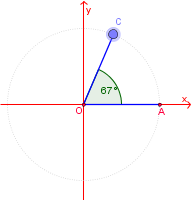
This example demonstrates how to measure angles in a coordinate system (counter-clockwise). Key math concepts include angle measurement, coordinate geometry, and geometric transformations. It utilizes commands/objects like Circle, Segment, Point, Angle, and Rotate from GeoGebra as per the construction summary. Suitable for 6th grade and above, ideal for teaching coordinate geometry and angle measurement, offering interactive learning experiences.
GeoGebra Commands & Parameters
Circle(O, A) → A_1Segment(O, A) → aPoint(A_1) → CAngle(A, O, C) → αSegment(O, C) → bRotate(A, β, O) → EAngle(A, O, E) → γ
AI Drawing Prompt Reference
Draw a circle in a coordinate system, create a line segment from the center to a point, mark the intersection of the segment with the circle, measure the angle formed by the center, the point, and the intersection, draw another segment from the center to the intersection point, rotate the initial point around the center by a certain angle to get a new point, and finally measure the angle formed by the center, the initial point, and the new point.
The prompt above was compiled from the original drawing commands and is for reference only.