
Angle Construction by Taylor Rish
Loading the math board and drawing, please wait…
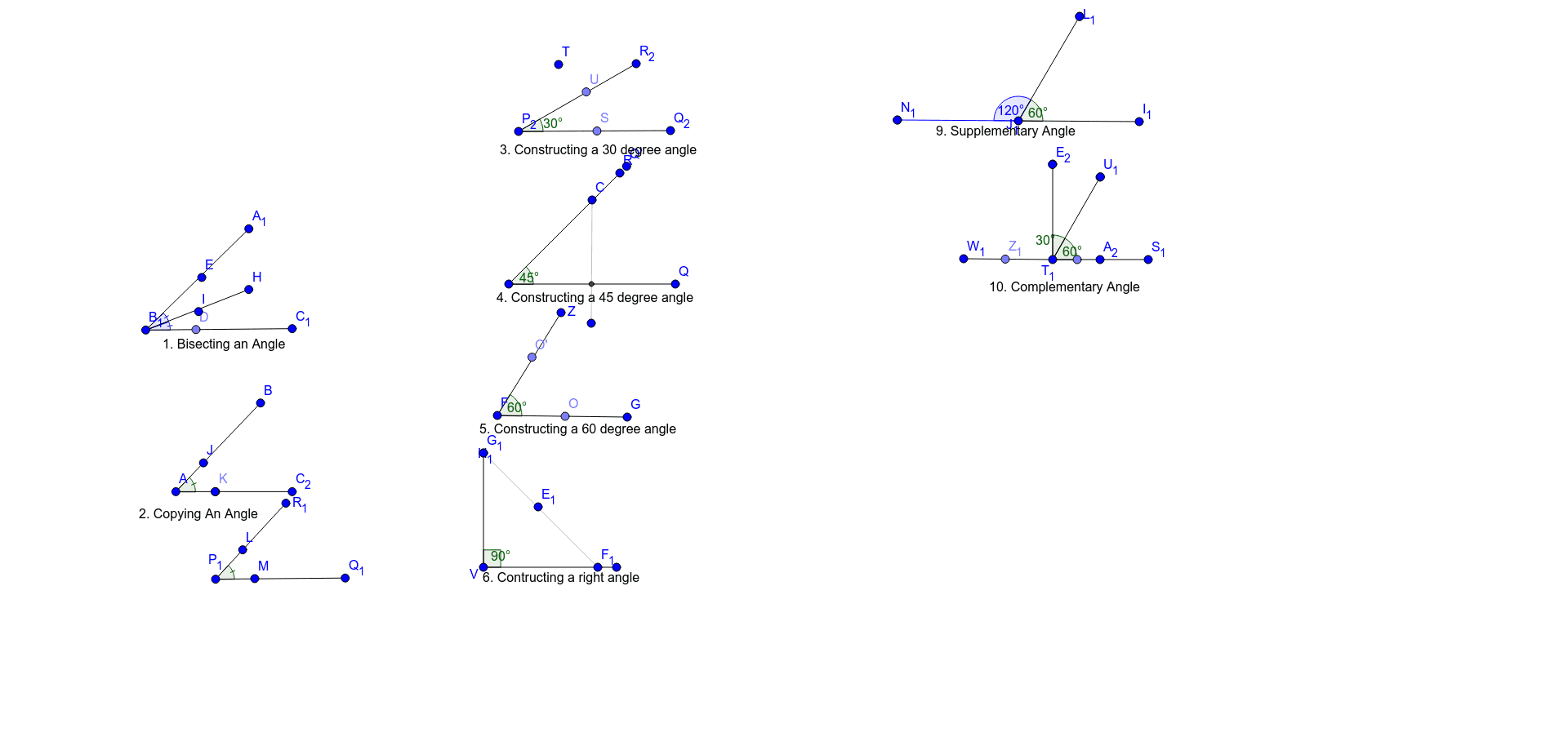
This example demonstrates how to construct angles using GeoGebra. Key mathematical concepts include the definition and properties of angles. Construction highlights include the use of Segment, Point, Angle, Rotate, and Intersect commands. Suitable for middle school and above students learning geometric construction.
GeoGebra Commands & Parameters
Segment(A_1, B_1) → fSegment(B_1, C_1) → gPoint(g) → DSegment(B_1, H) → hAngle(H, B_1, E) → αAngle(C_1, B_1, I) → βSegment(B, A) → iSegment(A, C_2) → jSegment(P_1, Q_1) → kPoint(j) → KSegment(P_1, R_1) → lAngle(M, P_1, L) → γAngle(K, A, J) → δSegment(P_2, Q_2) → mPoint(m) → SSegment(P_2, R_2) → nRotate(S, 30°, P_2) → UAngle(S, P_2, U) → εSegment(P, Q) → pSegment(C, N) → qIntersect(p, q) → WSegment(P, R) → rRotate(Q, 45°, P) → Q'Angle(Q, P, Q') → ζSegment(F, G) → sPoint(s) → OSegment(F, Z) → tRotate(O, 60°, F) → O'Angle(O, F, O') → ηSegment(V, D_1) → aSegment(F_1, H_1) → bSegment(H_1, V) → cRotate(F_1, 90°, V) → G_1Angle(F_1, V, G_1) → θSegment(I_1, J_1) → dSegment(J_1, L_1) → eRotate(I_1, 60°, J_1) → M_1Angle(I_1, J_1, M_1) → ιSegment(J_1, N_1) → f_1Rotate(L_1, 120°, J_1) → O_1Angle(L_1, J_1, O_1) → κSegment(S_1, T_1) → g_1Segment(T_1, U_1) → h_1Rotate(S_1, 60°, T_1) → V_1Angle(S_1, T_1, V_1) → λSegment(T_1, W_1) → i_1Point(i_1) → Z_1Point(g_1) → B_2Segment(D_2, T_1) → j_1Rotate(U_1, 30°, T_1) → E_2Angle(U_1, T_1, E_2) → μ
AI Drawing Prompt Reference
Draw a diagram of angle construction with two rays AB and AC and their included angle. Start by drawing ray AB, then draw ray AC, and construct angles ABC and ACB. Use rotation and intersection commands to create angles of 30°, 45°, 60°, and 90°, and at each step, construct new segments and angles to form a complex angle construction diagram.
The prompt above was compiled from the original drawing commands and is for reference only.