
Angle Between Two Vectors by HoFH
Loading the math board and drawing, please wait…
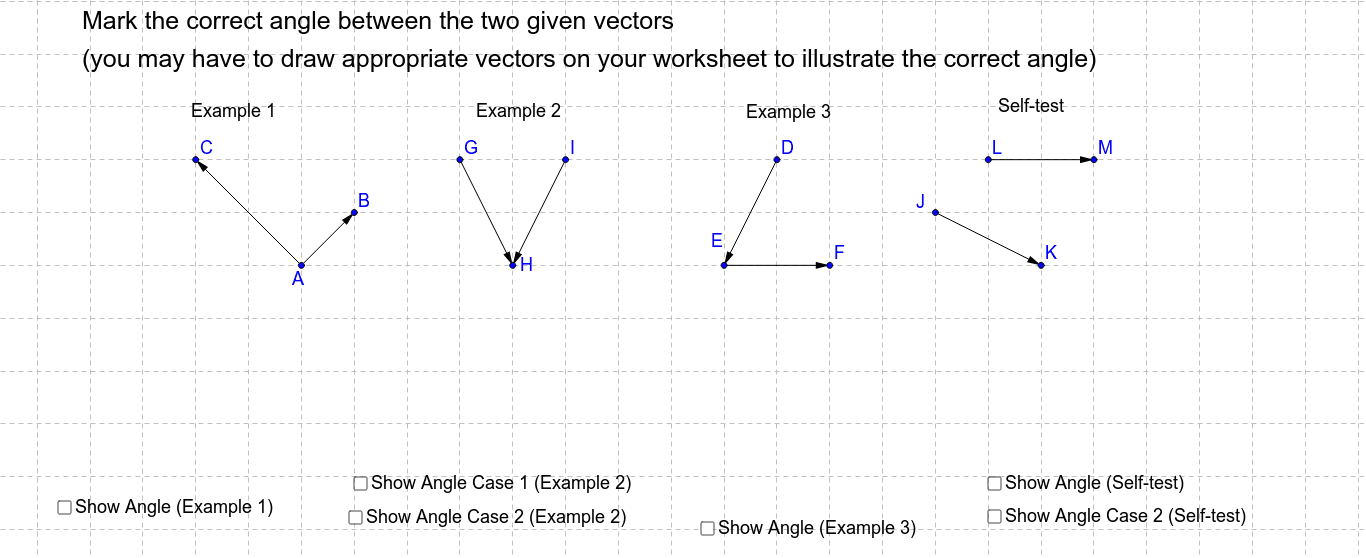
This GeoGebra example demonstrates how to identify and measure the angle between two vectors in a dynamic and visual way. The core mathematical concepts involved are the definition of the angle between vectors, its relation to dot product and magnitudes, and the use of trigonometric functions (cosine rule). The construction uses the Vector command to create vectors u, v, w, etc., the Angle command to directly construct and display angles α, β, γ, and the Translate command to shift vectors for better visualization. Text objects (text1 to text5) are used to label angle values and vector information. This example is suitable for high school or early college students learning vector geometry, coordinate geometry, or trigonometry, helping them intuitively grasp the concept of vector angles and verify related formulas.
GeoGebra Commands & Parameters
Vector(A, B) → uVector(A, C) → vVector(D, E) → wVector(E, F) → zVector(G, H) → aVector(I, H) → bAngle(u, v) → αTranslate(H, b) → H'Vector(H, H') → cTranslate(H, a) → H'_1Vector(H, H'_1) → fTranslate(E, w) → E'Vector(E, E') → hAngle(I, H, G) → βAngle(H', H, H'_1) → γAngle(E', E, F) → δVector(J, K) → jVector(L, M) → kVector(J, N) → lAngle(j, l) → εVector(L, O) → nAngle(n, k) → ζ
AI Drawing Prompt Reference
Draw two vectors u and v using the Vector command, then measure the angle α between them. Next, translate vector b to move point H to H', creating vector c. Then, translate vector a to move point H to H'_1, creating vector f. Translate vector w to move point E to E', creating vector h. Measure angles β, γ, and δ. Finally, create vectors j, k, l, and n, and measure angles ε and ζ.
The prompt above was compiled from the original drawing commands and is for reference only.