
Angle Between Two Planes by Albert Wong
Loading the math board and drawing, please wait…
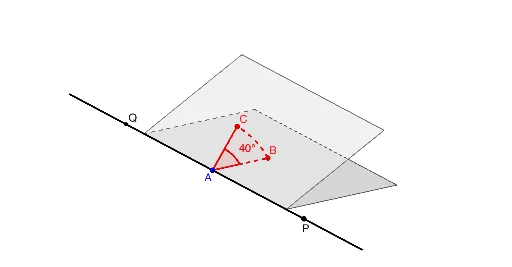
This example demonstrates how to calculate the angle between two planes using vector algebra and the dot product. It involves core concepts like plane equations, vector operations, and the cosine rule. Constructed with GeoGebra commands such as Point, Circle, Sequence, Line, Rotate, Intersect, Angle, CircumcircleSector, Polygon. Suitable for high school solid geometry and geometric construction learning.
GeoGebra Commands & Parameters
Point(Segment[(-2, 0, 0), (2, 0, 0)]) → ACircle(A, 1, xOyPlane) → cSequence(A + (cos(i°), sin(i°)), i, 0, 180) → list1Point(list1) → BLine(A, B) → bRotate(B, 90°, A) → B_1Line(B_1, A) → aRotate(B, α, a) → B_2Circle(b, B_2) → dIntersect(xOyPlane, d) → E, DSequence(Rotate[E, i°, b], i, 0, 180) → list2Point(list2) → CAngle(B, A, C) → BACRotate(B, α / 2, A, Plane[A, B, C]) → B'CircumcircleSector(B, B', C) → ePolygon((-2, 0), (2, 0), (2, 2), (-2, 2)) → poly1, g, h, i, jPolygon(Rotate[(2, 2, 0), f°, xAxis], Rotate[(-2, 2, 0), f°, xAxis], (-2, 0, 0), (2, 0, 0)) → poly2, k, l, m, nLine(P, Q) → pAngle(B, A, P) → BAPAngle(C, A, P) → CAP
AI Drawing Prompt Reference
Draw two intersecting lines and select a point on one of them. Draw a circle centered at this point. Mark points on the circle's circumference at 1-degree intervals and connect each point to the center to form line segments. Rotate one of these segments by 90 degrees around the center to create another segment. Rotate the points on the circle by angle α around the new segment. Draw a circle with the first segment as the diameter that intersects the xOy plane at two points. Rotate these intersection points around the first segment at 1-degree intervals to get a sequence of points. Connect the center to these points and form angles with the first segment. Create a sector using the center, the rotated point, and these points. Finally, draw a rectangle and two rotated copies of it, and label the angles formed by the two segments with the third segment.
The prompt above was compiled from the original drawing commands and is for reference only.