
Angle at Centre
Loading the math board and drawing, please wait…
In collections
Circle Geometry
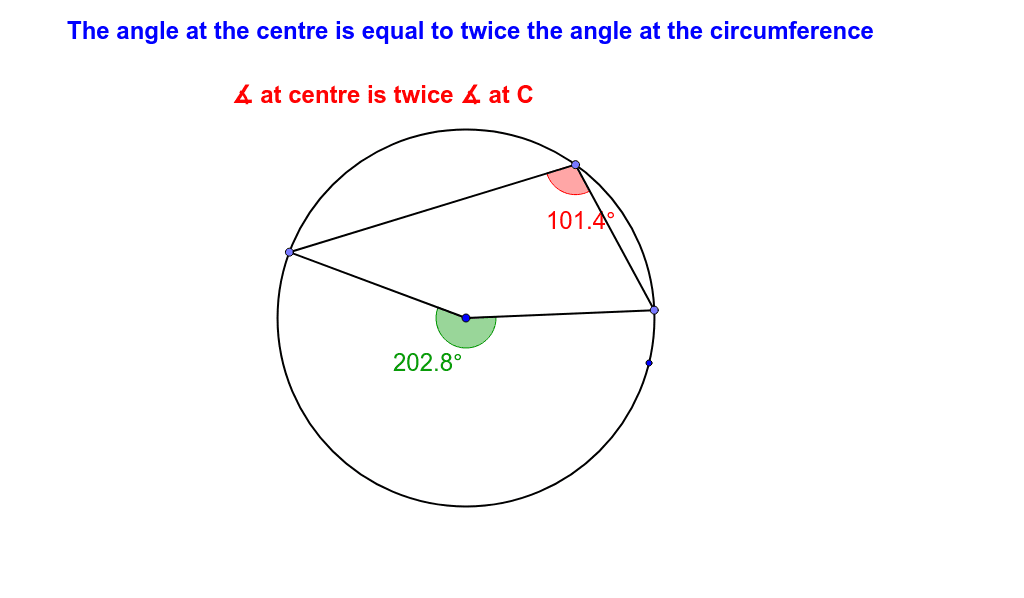
This example demonstrates that the angle at the center is twice the angle at the circumference. Key mathematical concepts include circle properties and angle relationships. It uses commands like Circle, Point, Segment, Angle, and Polygon in GeoGebra. Suitable for middle and high school students learning geometry.
GeoGebra Commands & Parameters
Circle(O_3, N) → pPoint(p) → O_1Point(p) → PSegment(O_1, P) → qSegment(P, O_3) → rPoint(p) → QSegment(O_3, Q) → sSegment(Q, O_1) → tAngle(P, O_3, Q) → ιAngle(P, O_1, Q) → APolygon(E_1, H_1, G_1, F_1) → poly1, e_2, h_2, g_2, f_2Angle(G_1, F_1, E_1) → λAngle(E_1, H_1, G_1) → ξAngle(F_1, E_1, H_1) → οAngle(H_1, G_1, F_1) → ρ
AI Drawing Prompt Reference
Draw a circle with center O_3, and points P and Q on the circle. Connect O_1 to P and Q to form line segments. Draw the angle from P to O_3 to Q, and the angle from P to O_1 to Q. Construct a polygon with points E_1, H_1, G_1, and F_1, and draw the angles between them. Ensure the diagram shows the relationship between the central angle and the inscribed angle, as well as the angles within the polygon.
The prompt above was compiled from the original drawing commands and is for reference only.