
AND Gate
Loading the math board and drawing, please wait…
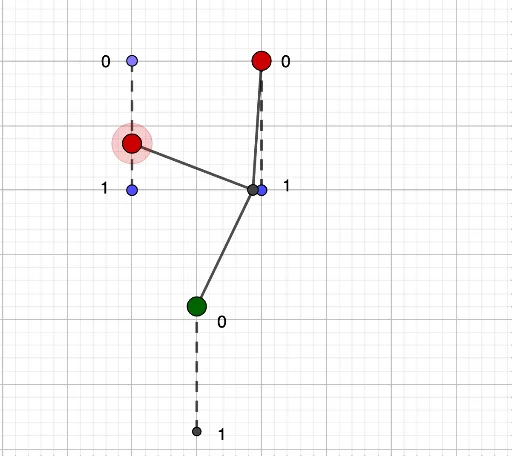
This example demonstrates the AND gate, a basic logic operation where the output is true only if all inputs are true. Through geometric construction, we can visually understand the working principle of the AND gate. The example uses commands such as Point, Segment, Mirror, Circle, and Intersect in GeoGebra. Suitable for middle school and above students to learn logic operations and geometric construction.
GeoGebra Commands & Parameters
Point(xAxis) → CSegment(C, D) → fMirror(C, yAxis) → C'Mirror(D, yAxis) → D'Segment(C', D') → f'Point(f) → APoint(f') → BCircle(A, 2) → cCircle(B, 2) → dIntersect(c, d, 1) → ESegment(A, E) → gSegment(B, E) → hCircle(C, 2) → eCircle(C', 2) → kIntersect(e, k, 1) → FCircle(F, 2) → pCircle(F, 4) → rIntersect(p, yAxis, 1) → GIntersect(r, yAxis, 1) → HSegment(G, H) → iCircle(E, 2) → sIntersect(s, yAxis, 1) → ISegment(E, I) → jCircle(E, 2) → q
AI Drawing Prompt Reference
Draw a horizontal segment with endpoints symmetric about the vertical axis. Place two points on this segment and draw equal circles centered at them, intersecting above the axis. Connect the intersection to both centers with segments. Then, mark two symmetric points on the axis, draw equal circles centered at them, intersecting on the axis. From that intersection, draw two concentric circles meeting the axis at two points, and connect those points vertically. Finally, center a circle at the upper intersection, mark its axis intersection, and connect it to the center. The figure forms a symmetric logic-gate-like construction.
The prompt above was compiled from the original drawing commands and is for reference only.