
Altitudes in Right Triangles - What is special here?
Loading the math board and drawing, please wait…
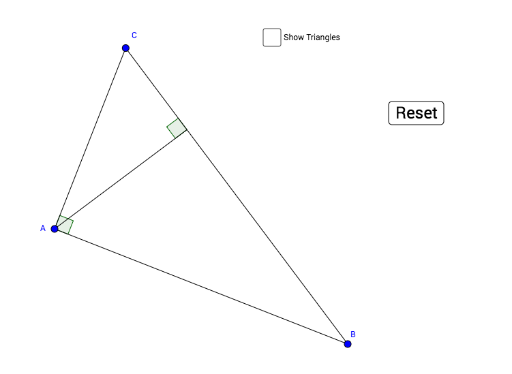
This GeoGebra example dynamically demonstrates the special properties of altitudes in right triangles, focusing on the intersection of the three altitudes (the orthocenter), the feet of the altitudes, and their relationships with the triangle's sides. It uses transformations such as reflection, rotation, translation, and dilation to construct multiple associated triangles, revealing symmetry and similarity patterns. Core mathematical concepts include the orthocenter of a right triangle, similar triangles, area relationships, and geometric transformations. The construction employs commands like Segment, OrthogonalLine, Point, Angle, Intersect, Polygon, Mirror, Rotate, Vector, Dilate, Translate, Line, Circle, and CircleSector to build the figure and its transformed copies. This resource is suitable for middle school to high school students exploring triangle properties, geometric transformations, and dynamic geometry, as well as for teachers demonstrating these concepts in class.
GeoGebra Commands & Parameters
Segment(A, B) → fOrthogonalLine(A, f) → gPoint(g) → CSegment(B, C) → hAngle(f, g) → αSegment(C, A) → iOrthogonalLine(A, h) → jAngle(h, j) → βIntersect(j, h) → DSegment(D, A) → kPolygon(C, A, D) → poly1, d, c, aPolygon(A, B, D) → poly2, d_1, a_1, bMirror(C, i) → C'Mirror(A, i) → A'Mirror(D, i) → D'Polygon(C', A', D') → poly5, d', c', a'Mirror(A, f) → A'_1Mirror(B, f) → B'Mirror(D, f) → D'_1Polygon(A'_1, B', D'_1) → poly2', d'_1, a'_1, b'Polygon(C, A, B) → poly3, b_1, c_1, a_2Point(g) → EAngle(E, A, D'_1) → γPoint(g) → FRotate(A'_1, If[0 < e ≤ 1, ((-e) * γ), (-γ)], A) → GRotate(B', If[0 < e ≤ 1, ((-e) * γ), (-γ)], A) → B''Rotate(D'_1, If[0 < e ≤ 1, ((-e) * γ), (-γ)], A) → HPolygon(G, B'', H) → poly4, h_1, g_1, b''Vector(H, A) → uDilate(H, If[1.5 < e < 2.5, 2.5 - e, 0], A) → H'Vector(H, H') → vTranslate(G, v) → G'Translate(B'', v) → B'''Translate(H, v) → H'_1Polygon(G', B''', H'_1) → poly4', h'_1, g', b'''Line(A, B) → lPoint(l) → IAngle(D', A, I) → δRotate(C', If[3 < e < 4, (δ * (e - 3)), δ], A) → C''Rotate(A', If[3 < e < 4, (δ * (e - 3)), δ], A) → A''Rotate(D', If[3 < e < 4, (δ * (e - 3)), δ], A) → D''Polygon(C'', A'', D'') → poly5', d'', c'', a''Dilate(D'', If[4 < e < 5, 5 - e, 0], A) → D'''Vector(D'', D''') → wTranslate(C'', w) → C'''Translate(A'', w) → A'''Translate(D'', w) → D'''_1Polygon(C''', A''', D'''_1) → poly5'', d'''_1, c''', a'''Segment(C''', A''') → pSegment(A''', D'''_1) → qSegment(C''', D'''_1) → rPoint(f) → JPoint(i) → LCircle(C''', L) → s_1Circle(A''', J) → tIntersect(s_1, p) → K,Intersect(t, p) → M,CircleSector(C''', L, K) → e_1CircleSector(A''', M, J) → f_1Intersect(f_1, f, 1) → NDilate(C''', If[0 ≤ s ≤ 1, 1 - s, 0], G') → ODilate(A''', If[0 ≤ s ≤ 1, 1 - s, 0], B''') → PVector(C''', O) → u_1Vector(A''', P) → v_1Translate(e_1, u_1) → k_1Translate(f_1, v_1) → p_1Dilate(C''', If[1 ≤ s ≤ 2, 2 - s, 0], C) → QDilate(A''', If[1 ≤ s ≤ 2, 2 - s, 0], B) → RVector(C''', Q) → w_1Vector(A''', R) → i_1Translate(e_1, w_1) → q_1Translate(f_1, i_1) → r_1
AI Drawing Prompt Reference
Draw a right triangle, label its three altitudes, and show their intersection point (orthocenter). Also, mark the feet of each altitude and display their relationships with the triangle's sides. Use transformations like reflection, rotation, translation, and dilation to construct multiple associated triangles, revealing symmetry and similarity patterns.
The prompt above was compiled from the original drawing commands and is for reference only.