
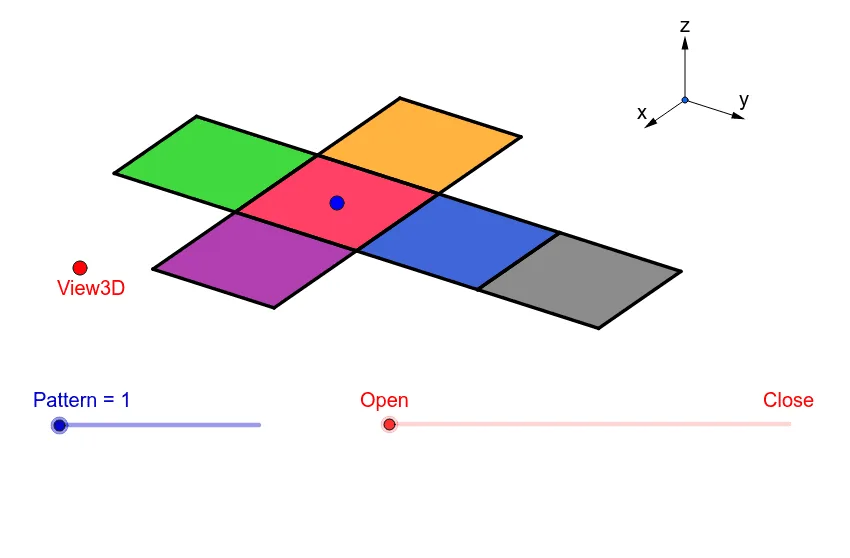
All 11 Nets of a Cube (Interactive Folding)
Loading the math board and drawing, please wait…
① This example demonstrates all 11 distinct nets of a cube—the planar unfoldings obtained by cutting along edges—and allows dynamic switching between the 3D cube and its 2D net. ② Core mathematical concepts include solid geometry (nets and folding), combinatorics (counting the 11 non-congruent nets), symmetry, and properties of polygons and segments. ③ Construction highlights: using GeoGebra commands such as Vector, Translate, OrthogonalLine, Polygon, Midpoint, Segment, and Mirror, the model builds a 3D cube and its unfolding process, with objects including View3D, points (A, P, O, etc.), segments (a, b, d), polygon poly1, and auxiliary parameters (sinphi, cosphi, sintheta, costheta) for camera rotation. ④ Suitable for middle-to-high school geometry classes, combinatorial math introductions, or teacher-made interactive materials to help students visualize the correspondence between spatial solids and their planar nets.
GeoGebra Commands & Parameters
Vector(B_1, Z) → wVector(B_1, Y) → vVector(B_1, X) → uTranslate(A, Vector[(2 * v)]) → A'Translate(P, Vector[(2 * v)]) → P'OrthogonalLine(View3D, yAxis) → a_1OrthogonalLine(View3D, xAxis) → b_1Polygon(L, K, N, M) → poly1, l, k_1, n, mPolygon(K, P, Q, N) → poly2, k_2, p, q, n_1Polygon(L, M, S, R) → poly3, l_1, m_1, s, rPolygon(N, V, W, M) → poly4, n_2, v_1, w_1, m_2Polygon(K, T, U, L) → poly5, k_3, t, u_1, l_2Polygon(B, Q, P, A) → poly6, b_2, q_1, p_1, a_2Midpoint(R, M) → DTranslate(S, Vector[(-((2 * v)))]) → S'Segment(S, C) → eTranslate(M, Vector[((-2) * v)]) → M'Segment(M, E) → fSegment(E, C) → hTranslate(N, Vector[((-2) * v)]) → N'Translate(Q, Vector[((-2) * v)]) → Q'_1Segment(Q, F) → iSegment(N, G) → jSegment(G, F) → d_1Translate(Q, Vector[((-2) * v)]) → Q'_2Translate(B, Vector[((-2) * v)]) → B'_1Segment(B, I) → e_1Segment(I, H) → f_1Segment(H, Q) → g_1Translate(K, Vector[(2 * v)]) → K'Translate(P, Vector[(2 * v)]) → P'_1Segment(P, J) → h_1Segment(J, A_1) → i_1Segment(A_1, K) → j_1Segment(B, H_1) → s_1Segment(H_1, C_1) → cSegment(C_1, A) → r_1Midpoint(N, P) → D_1Midpoint(k_1) → F_1Segment(A, G_1) → t_1Segment(G_1, I_1) → c_2Segment(I_1, P) → d_2Segment(J, K_1) → f_2Segment(P, L_1) → e_2Segment(L_1, K_1) → g_2Segment(M, W) → h_2Mirror(L_1, F_1) → O_1Mirror(K_1, F_1) → P_1Segment(M, M_1) → i_2Segment(N_1, J_1) → j_2Segment(J_1, M_1) → p_2Polygon(M, E, C, S) → poly7, q_2, r_2, s_2, t_2Polygon(Q, N, G, F) → poly8, q_3, n_3, g_3, f_3Polygon(B, Q, H, I) → poly9, b_3, q_4, h_3, i_3Polygon(J, A_1, K, P) → poly10, j_3, a_3, k_4, p_3Polygon(C_1, A, B, H_1) → poly11, c_3, a_4, b_4, h_4Polygon(G_1, I_1, P, A) → poly12, g_4, i_4, p_4, a_5Polygon(K_1, J, P, L_1) → poly13, k_5, j_4, p_5, l_3Polygon(M, M_1, J_1, N_1) → poly14, m_3, m_4, j_5, n_4