
Algebraic Operations on Complex Numbers
Loading the math board and drawing, please wait…
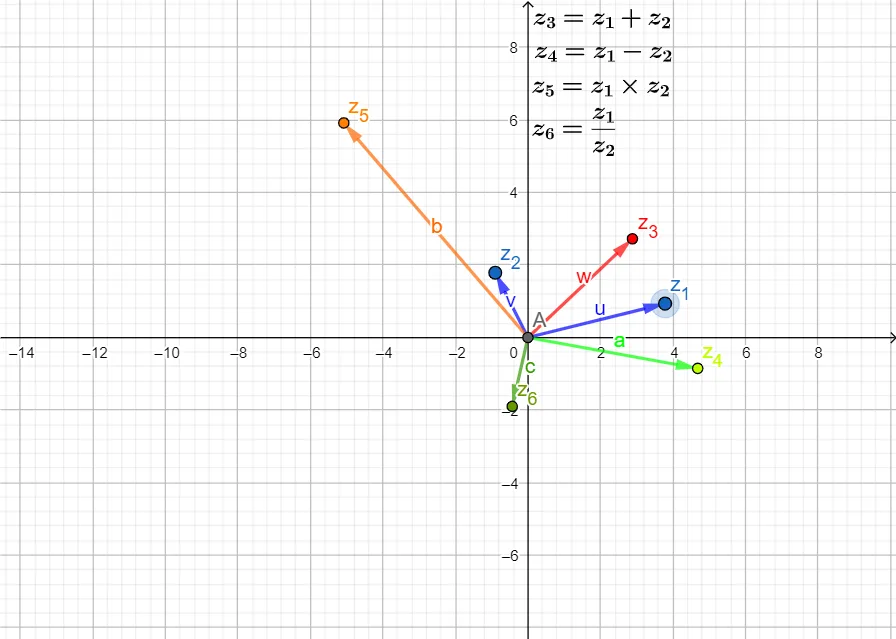
This example demonstrates algebraic operations on complex numbers, such as addition, subtraction, multiplication, and division, with geometric visualizations. It covers core concepts including the algebraic properties of complex numbers, their vector representation, conjugates, and modulus. The construction uses GeoGebra’s Intersect and Vector commands, with objects like z_1, z_2 representing the numbers and text objects displaying results. Intended for high‑school or early university students, it serves as an interactive tool for learning complex arithmetic.
GeoGebra Commands & Parameters
Intersect(xAxis, yAxis) → AVector(A, z_1) → uVector(A, z_2) → vVector(A, z_{3}) → wVector(A, z_{4}) → aVector(A, z_{5}) → bVector(A, z_{6}) → c
AI Drawing Prompt Reference
Draw a Cartesian plane with origin, then from the origin draw six vectors representing two complex numbers z1 and z2 and the results of their addition, subtraction, multiplication, and division (six complex points total). Show each vector as an arrow indicating magnitude and direction, illustrating the geometric meaning of complex arithmetic, including conjugation and modulus. The vectors originate at the intersection of the axes, each tip marks a complex number, and the arrangement visually demonstrates how algebraic operations correspond to vector addition, rotation, and scaling.
The prompt above was compiled from the original drawing commands and is for reference only.