
Alex and the Random Number Generator
Loading the math board and drawing, please wait…
In collections
Wahrscheinlichkeitsrechnung - Einführung
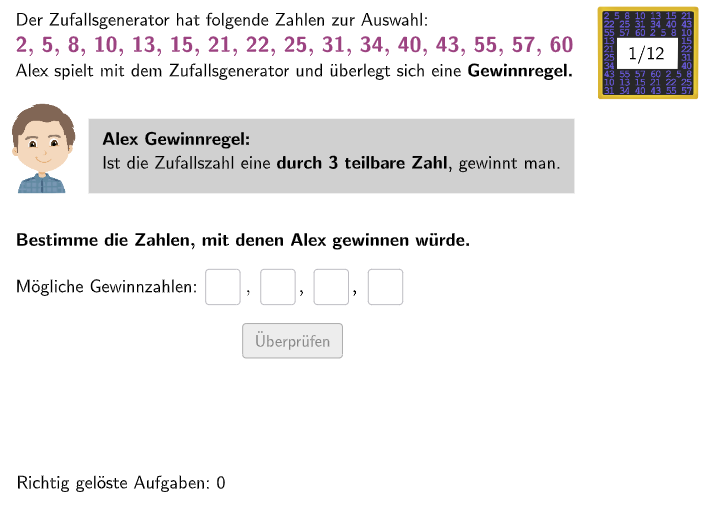
Alex and the Random Number Generator is an interactive math example that demonstrates the concepts of probability statistics. The example shows how a random number generator works, and students can change the distribution of random numbers by inputting different parameters. The key math concepts involved include probability, random variables, and statistical distributions. The construction of the example uses GeoGebra commands/objects such as Textfield, Join, If, Polygon, Length, and CountIf. It is suitable for teaching probability statistics in middle school and high school.
GeoGebra Commands & Parameters
Textfield(inputb) → InputBoxBTextfield(input1) → InputBox1Join({{6, 3}, Shuffle[{1, 2, 4, 5, 7, 8, 9, 10, 11, 12}]}) → randomNumsTextfield(input2) → InputBox2Textfield(input3) → InputBox3Textfield(input4) → InputBox4Textfield(input5) → InputBox5Textfield(input6) → InputBox6Textfield(input7) → InputBox7Textfield(input8) → InputBox8Textfield(input9) → InputBox9If(bsp ≟ 2, c1 ∧ c2 ∧ c3 ∧ c4 ∧ c5 ∧ c6 ∧ c7 ∧ c8 ∧ c9, If[bsp ≟ 5, c1 ∧ c2 ∧ c3 ∧ c4 ∧ c5 ∧ c6 ∧ c7, If[bsp ≟ 6, c1 ∧ c2 ∧ c3 ∧ c4, If[bsp ≟ 8, c1 ∧ c2 ∧ c3 ∧ c4 ∧ c5 ∧ c6 ∧ c7, If[bsp ≟ 10, c1 ∧ c2 ∧ c3 ∧ c4 ∧ c5, If[bsp ≟ 11, c1 ∧ c2 ∧ c3, If[bsp ≟ 12, c1 ∧ c2 ∧ c3 ∧ c4]]]]]]) → correct1If(aufgabenstellung ≟ 1, correct1, correct2) → correctPolygon(PtopLeftCornerFeedback, PtopRightCornerFeedback, PbottomRightCornerFeedback, PbottomLeftCornerFeedback) → rectangleCorrect, rectangleCorrectS3, rectangleCorrectS4, rectangleCorrectS2, rectangleCorrectS1Length(sols(bsp)) → anzahlLoesungenCountIf(Defined[a], a, inputs) → inputsAusgefuelltIf(aufgabenstellung ≟ 1, anzahlLoesungen ≟ inputsAusgefuellt, Defined[inputb]) → fixedIf(bsp ≟ 2, c1 ∨ c2 ∨ c3 ∨ c4 ∨ c5 ∨ c6 ∨ c7 ∨ c8 ∨ c9, If[bsp ≟ 5, c1 ∨ c2 ∨ c3 ∨ c4 ∨ c5 ∨ c6 ∨ c7 ∨ c8, If[bsp ≟ 6, c1 ∨ c2 ∨ c3, If[bsp ≟ 8, c1 ∨ c2 ∨ c3 ∨ c4 ∨ c5 ∨ c6 ∨ c7, If[bsp ≟ 10, c1 ∨ c2 ∨ c3 ∨ c4 ∨ c5 ∨ c6, If[bsp ≟ 11, c1 ∨ c2 ∨ c3, If[bsp ≟ 12, c1 ∨ c2 ∨ c3]]]]]]) → correctpartiallyUnique(inputs) → l1
AI Drawing Prompt Reference
Draw an interactive probability and statistics teaching interface with multiple text input boxes for entering parameters and a result display area. On the left side, arrange nine small text input boxes for receiving user numerical input. At the top, place a larger input box for setting basic parameters. In the center of the interface, display a set of numbers generated through random shuffling, presented in list form. In the lower right corner, create a rectangular area that shows different color feedback based on whether the user's input answers are correct, which can appear as a single rectangle or multiple stacked rectangular blocks. The entire interface is designed to help students understand concepts of random variables and statistical distributions.
The prompt above was compiled from the original drawing commands and is for reference only.