
Addition within 20 with Ten Sticks
Loading the math board and drawing, please wait…
In collections
Elementary School Applets
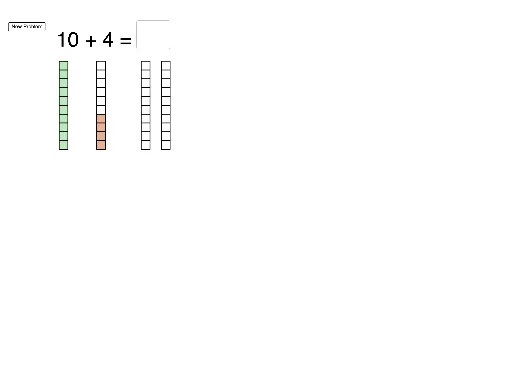
This example uses ten sticks to visually demonstrate addition within 20. The core mathematical concepts include addition and number combination. The construction uses GeoGebra commands such as Sequence, Polygon, Random, Flatten, Textfield, Vector, and Translate. Suitable for first or second-grade students to learn addition.
GeoGebra Commands & Parameters
Sequence(B + (0, (edge * i)), i, 0, 9) → RightDotsPolygon(Element[RightDots, 10], Element[RightDots, 10] + (edge, 0), 4) → RightPoly10Random(4, 10) → seed1Flatten(Sequence[Sequence[C + ((i * (edge + gap)), (j * edge)), j, 0, 9], i, 0, 1]) → locationPolygon(Element[RightDots, 9], Element[RightDots, 9] + (edge, 0), 4) → RightPoly9Polygon(Element[RightDots, 8], Element[RightDots, 8] + (edge, 0), 4) → RightPoly8Polygon(Element[RightDots, 7], Element[RightDots, 7] + (edge, 0), 4) → RightPoly7Polygon(Element[RightDots, 6], Element[RightDots, 6] + (edge, 0), 4) → RightPoly6Polygon(Element[RightDots, 5], Element[RightDots, 5] + (edge, 0), 4) → RightPoly5Polygon(Element[RightDots, 4], Element[RightDots, 4] + (edge, 0), 4) → RightPoly4Polygon(Element[RightDots, 3], Element[RightDots, 3] + (edge, 0), 4) → RightPoly3Polygon(Element[RightDots, 2], Element[RightDots, 2] + (edge, 0), 4) → RightPoly2Polygon(Element[RightDots, 1], Element[RightDots, 1] + (edge, 0), 4) → RightPoly1Random(4, 10) → seed2Textfield(inputtotal) → InputBox1Sequence(Polygon[A + (0, (i * edge)), A + (0, (i * edge)) + (edge, 0), 4], i, 0, 9) → TenStick1Sequence(Polygon[B + (0, (i * edge_2)), B + (0, (i * edge_2)) + (edge_2, 0), 4], i, 0, 9) → TenStick2Sequence(A + (0, (edge * i)), i, 0, 9) → LeftDotsSequence(Polygon[Element[LeftDots, i + 1], Element[LeftDots, i + 1] + (edge, 0), 4], i, 0, seed1 - 1) → SquaresLeftSequence(Polygon[Element[RightDots, i + 1], Element[RightDots, i + 1] + (edge, 0), 4], i, 0, seed2 - 1) → SquaresRightVector(A, C) → uTranslate(SquaresLeft, Vector[(u * a)]) → SquaresLeft'Translate(RightPoly1, Vector[(move1 * Vector[Element[RightDots, 1], Element[location, seed1 + 1]])]) → MoveRight1Translate(RightPoly2, Vector[(move2 * Vector[Element[RightDots, 2], Element[location, seed1 + 2]])]) → MoveRight2Translate(RightPoly3, Vector[(move3 * Vector[Element[RightDots, 3], Element[location, seed1 + 3]])]) → MoveRight3Translate(RightPoly4, Vector[(move4 * Vector[Element[RightDots, 4], Element[location, seed1 + 4]])]) → MoveRight4Translate(RightPoly5, Vector[(move5 * Vector[Element[RightDots, 5], Element[location, seed1 + 5]])]) → MoveRight5Translate(RightPoly6, Vector[(move6 * Vector[Element[RightDots, 6], Element[location, seed1 + 6]])]) → MoveRight6Translate(RightPoly7, Vector[(move7 * Vector[Element[RightDots, 7], Element[location, seed1 + 7]])]) → MoveRight7Translate(RightPoly8, Vector[(move8 * Vector[Element[RightDots, 8], Element[location, seed1 + 8]])]) → MoveRight8Translate(RightPoly10, Vector[(move10 * Vector[Element[RightDots, 10], Element[location, seed1 + 10]])]) → MoveRight10Translate(RightPoly9, Vector[(move9 * Vector[Element[RightDots, 9], Element[location, seed1 + 9]])]) → MoveRight9Sequence(Polygon[Element[location, 1] + (0, (i * edge)), Element[location, 1] + (0, (i * edge)) + (edge, 0), 4], i, 0, 9) → AnswerStick1Sequence(Polygon[Element[location, 11] + (0, (i * edge)), Element[location, 11] + (0, (i * edge)) + (edge, 0), 4], i, 0, 9) → AnswerStick2
AI Drawing Prompt Reference
Draw a ten-stick addition diagram with two rows of 10 sticks each. The left row represents one addend, and the right row represents the other addend. Randomly move some sticks from the left to the right to form a new combination, showing the result of the addition. Include an input box on the right to enter the total sum.
The prompt above was compiled from the original drawing commands and is for reference only.