
Addition with Regrouping
Loading the math board and drawing, please wait…
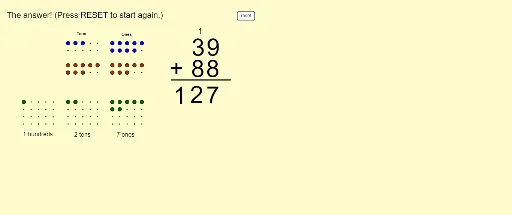
This example demonstrates the process of addition with regrouping. Key mathematical concepts include addition and regrouping. Using GeoGebra commands such as Flatten, Textfield, Mod, Sequence, etc., a visual representation of the addition process is created. Suitable for high-grade elementary or low-grade middle school students to learn addition with regrouping.
GeoGebra Commands & Parameters
Flatten(Sequence[Sequence[(x(A) + (i * horizontalspacing), y(A) - (j * verticalspacing)), i, 0, horizontalnumber - 1], j, 0, verticalnumber - 1]) → firstonesarrayFlatten(Sequence[Sequence[(x(B) + (i * horizontalspacing), y(B) - (j * verticalspacing)), i, 0, horizontalnumber - 1], j, 0, verticalnumber - 1]) → firsttensarrayFlatten(Sequence[Sequence[(x(C) + (i * horizontalspacing), y(C) - (j * verticalspacing)), i, 0, horizontalnumber - 1], j, 0, verticalnumber - 1]) → firsthundredsarrayFlatten(Sequence[Sequence[(x(D) + (i * horizontalspacing), y(D) - (j * verticalspacing)), i, 0, horizontalnumber - 1], j, 0, verticalnumber - 1]) → secondonesarrayFlatten(Sequence[Sequence[(x(E) + (i * horizontalspacing), y(E) - (j * verticalspacing)), i, 0, horizontalnumber - 1], j, 0, verticalnumber - 1]) → secondtensarrayFlatten(Sequence[Sequence[(x(F) + (i * horizontalspacing), y(F) - (j * verticalspacing)), i, 0, horizontalnumber - 1], j, 0, verticalnumber - 1]) → secondhundredsarrayFlatten(Sequence[Sequence[(x(G) + (i * horizontalspacing), y(G) - (j * verticalspacing)), i, 0, horizontalnumber - 1], j, 0, verticalnumberanswer - 1]) → answeronesarrayFlatten(Sequence[Sequence[(x(H) + (i * horizontalspacing), y(H) - (j * verticalspacing)), i, 0, horizontalnumber - 1], j, 0, verticalnumberanswer - 1]) → answertensarrayFlatten(Sequence[Sequence[(x(I) + (i * horizontalspacing), y(I) - (j * verticalspacing)), i, 0, horizontalnumber - 1], j, 0, verticalnumberanswer - 1]) → answerhundredsarrayTextfield(inputfirsttext) → inputfirstTextfield(inputsecondtext) → inputsecondMod(inputfirstnumber, 10) → firstonesMod(inputsecondnumber, 10) → secondonesSequence(Element[firstonesarray, i], i, 1, firstones) → displayfirstonesSequence(Element[firsttensarray, i], i, 1, firsttens) → displayfirsttensSequence(Element[secondonesarray, i], i, 1, secondones) → displaysecondonesSequence(Element[secondtensarray, i], i, 1, secondtens) → displaysecondtensSequence(Translate[Element[displayfirstones, i], Vector[(slideit * Vector[Element[firstonesarray, i], Element[answeronesarray, i]])]], i, 1, firstones) → swoopfirstonesSequence(Translate[Element[displayfirsttens, i], Vector[(slideit * Vector[Element[firsttensarray, i], Element[answertensarray, i]])]], i, 1, firsttens) → swoopfirsttensSequence(Translate[Element[displaysecondones, i], Vector[(slideit * Vector[Element[secondonesarray, i], Element[answeronesarray, i + firstones]])]], i, 1, secondones) → swoopsecondonesSequence(Translate[Element[displaysecondtens, i], Vector[(slideit * Vector[Element[secondtensarray, i], Element[answertensarray, i + firsttens]])]], i, 1, secondtens) → swoopsecondtensSequence(Element[answeronesarray, i], i, 1, answerones) → displayansweronesSequence(Element[answertensarray, i], i, 1, answertens) → displayanswertensSequence(Element[answerhundredsarray, i], i, 1, answerhundreds) → displayanswerhundredsSegment(J, K) → fMod(inputfirstnumber, 10) → inputfirstonesMod(inputsecondnumber, 10) → inputsecondones
AI Drawing Prompt Reference
Create a visual representation of the addition with regrouping process, showing the units, tens, and hundreds of three numbers with differently colored small blocks. First, draw the units, tens, and hundreds of the two addends, then draw the units, tens, and hundreds of the sum. Use animation to demonstrate the regrouping process, where blocks move from the corresponding digits of the first number to the corresponding digits of the second number, and finally merge into the corresponding digits of the sum. The layout should be clear and the colors distinct.
The prompt above was compiled from the original drawing commands and is for reference only.