
Addition and Subtraction Practice: Interactive Random Number Drills with Geometr
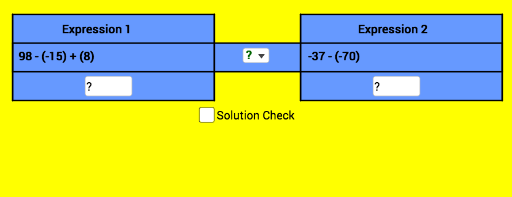
Loading the math board and drawing, please wait…
① This example demonstrates an interactive drill for addition and subtraction, where randomly generated numbers are paired with polygon shapes to create a visual learning experience. ② Core math concepts include integer addition and subtraction, random number generation, linear functions (used to position points), and basic statistical characteristics such as the median, with binomial distribution as an extended context. ③ Construction highlights: Using GeoGebra commands such as Textfield, Random, Element, Polygon, Point, Corner, SelectedIndex, and If, the applet creates multiple points (A, B, C, D, etc.), polygons (poly1, poly2, poly3), an input box (InputBox1), a button (button1), and lists (list1, list2, list3). Random elements from lists generate problems, and the If command checks answer correctness. ④ Suitable for early elementary students practicing arithmetic, and for teachers building interactive lessons that combine numerical operations with geometric visualization, fostering an intuitive understanding of both math domains.
GeoGebra Commands & Parameters
Textfield(A1) → InputBox1Random(-100, 100) → aRandom(-100, 100) → bRandom(-100, 100) → cRandom(-100, 100) → dRandom(-100, 100) → eRandom(-100, 100) → fRandom(-100, 100) → gRandom(-100, 100) → hRandom(1, 14) → iRandom(1, 14) → jElement(list1, i, 1) → text1Element(list2, j, 1) → text2Polygon(A, B, C, D) → poly1, a_1, b_1, c_1, d_1Point(a_1) → EPoint(c_1) → FPoint(c_1) → GPoint(a_1) → HPolygon(E, F, G, H) → poly2, e_1, f_1, g_1, h_1Point(d_1) → IPoint(b_1) → JPolygon(I, J, B, A) → poly3, i_1, j_1, b_2, a_2Point(b_1) → LPolygon(I, K, L, J) → poly4, i_2, k_1, l, j_2Polygon(K, D, C, L) → poly5, k_2, d_2, c_2, l_1Corner(1) → SCorner(2) → TCorner(3) → UCorner(4) → VPolygon(S, T, U, V) → poly6, s, t, u, vElement(list1, i, 2) → kTextfield(A2) → InputBox2Element(list2, j, 2) → mSelectedIndex(list3) → oIf(k ≟ m, 4, If[k > m, 2, 3]) → p
AI Drawing Prompt Reference
Create a graphic composed of multiple polygons generated with random numbers, including five polygons: one quadrilateral formed by points A, B, C, and D; one quadrilateral formed by points E, F, G, and H; one quadrilateral formed by points I, J, B, and A; one quadrilateral formed by points I, K, L, and J; and one quadrilateral formed by points K, D, C, and L. Each polygon contains a text field to display a random number. Users can input answers in an input box and check their correctness with a button.
The prompt above was compiled from the original drawing commands and is for reference only.