
Adding and Subtracting Integers – Interactive Tutor with Step‑by‑Step Feedback
Loading the math board and drawing, please wait…
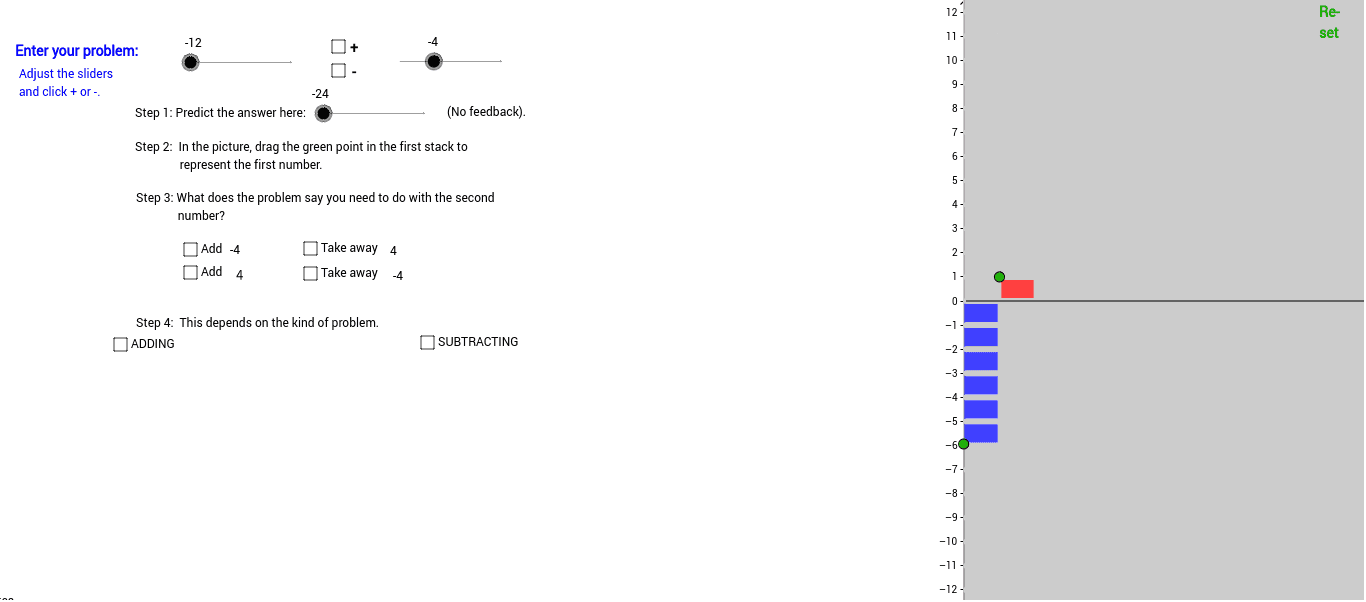
This GeoGebra example provides an intelligent tutor for adding and subtracting integers, guiding learners through each step with instant feedback. It visualizes integer operations on a number line or coordinate plane, illustrating how positive and negative values combine and cancel. The construction employs GeoGebra objects such as points, segments, lines, orthogonal lines, polygons, and intersections to create an interactive learning environment. Designed for middle‑school and high‑school students, it also serves as a classroom demonstration tool for teachers.
GeoGebra Commands & Parameters
Intersect(xAxis, yAxis) → CPoint(xAxis) → DPolygon(C, A, B, D) → poly1, c, a_1, b, dPoint(yAxis) → FPolygon(C, E, H, D) → poly2, c_1, e, h, d_1Segment(I, J) → fSegment(G, N) → iSegment(F, K) → gPoint(g) → LIntersect(c, g) → MOrthogonalLine(L, g) → jIntersect(j, f) → OPoint(f) → PSegment(Q, R) → kOrthogonalLine(P, f) → l_2Intersect(l_2, k) → SIntersect(l_2, i) → T_3Segment(S, T_3) → mPoint(m) → UIntersect(e, f) → VPolygon(L, O, V, E) → poly4, l_1, o_1, v, e_1Polygon(I, P, S, Q) → poly5, i_2, p, s, qPolygon(F, I, O, L) → poly3, f_1, i_1, o, lPolygon(V, W, S, P) → poly6, v_1, w, s_1, p_1Polygon(F, I, Z, C) → poly7, f_2, i_3, z, c_2Polygon(C, Z, J, K) → poly8, c_3, z_1, j_1, k_1Polygon(I, Q, A_1, Z) → poly9, i_4, q_1, a_2, z_2Polygon(Z, A_1, R, J) → poly10, z_3, a_3, r, j_2Polygon(B_1, B, T_3, S) → poly11, b_1, b_2, t, s_2OrthogonalLine(U, xAxis) → nIntersect(n, xAxis) → C_1Polygon(U, T_3, D, C_1) → poly12, u, t_1, d_2, c_4Polygon(B_1, B, D, A_1) → poly13, b_3, b_4, d_3, a_4Polygon(W, S, T_3, H) → poly14, w_1, s_3, t_2, h_1Polygon(C_1, D, T_3, U) → poly15, c_5, d_4, t_3, u_1Polygon(A_1, D, H, W) → poly16, a_5, d_5, h_2, w_2Segment(D_1, E_1) → e_2Segment(F_1, G_1) → g_2Segment(H_1, I_1) → k_2Segment(J_1, K_1) → m_2Segment(L_1, M_1) → n_2Segment(N_1, O_1) → p_2Segment(P_1, Q_1) → q_2Segment(R_1, S_1) → r_2Segment(T_1, U_1) → e_3Segment(V_1, W_1) → f_3Segment(Z_1, A_2) → h_3Segment(B_2, C_2) → j_3Segment(D_2, E_2) → k_3Segment(F_2, G_2) → l_3Segment(H_2, I_2) → m_3Segment(J_2, K_2) → n_3Segment(L_2, M_2) → p_3Segment(N_2, O_2) → q_3Segment(P_2, Q_2) → r_3Segment(R_2, S_2) → e_4Segment(T_2, U_2) → f_4Segment(V_2, W_2) → g_4Segment(Z_2, A_3) → h_4Segment(B_3, C_3) → j_4Segment(D_3, E_3) → k_4Point(l_4) → F_3OrthogonalLine(F_3, l_4) → m_4Intersect(m_4, g_1) → G_3Intersect(m_4, yAxis) → H_3Segment(H_3, G_3) → n_4Segment(H_3, Z) → p_4Segment(G_3, F_2) → q_4Point(r_4) → I_3OrthogonalLine(I_3, r_4) → s_4Intersect(s_4, g_1) → J_3Intersect(s_4, g_3) → K_3Segment(Z, K_3) → t_4Segment(A_1, J_3) → b_5Segment(J_3, K_3) → e_5Point(i_5) → TOrthogonalLine(T, i_5) → f_5Intersect(f_5, g_5) → M_3OrthogonalLine(L_3, g_5) → h_5Intersect(i_5, h_5) → N_3Segment(M_3, T) → j_5Segment(T, N_3) → k_5Segment(N_3, L_3) → l_5Segment(F_2, O_3) → m_5Segment(O, Z) → n_5Segment(Z, P) → s_5Intersect(r_5, g_1) → Q_3Segment(P, Q_3) → t_5Intersect(i_5, r_5) → R_3Segment(T, R_3) → a_6Intersect(b_6, g_1) → S_3Segment(P, S_3) → c_6Line(O, L) → d_6Intersect(p_5, yAxis) → P_3Segment(P_3, L) → q_5Intersect(l_4, b_6) → U_3Segment(F_3, U_3) → e_6Intersect(r_5, r_4) → V_3Segment(I_3, V_3) → f_6Intersect(l_4, p_5) → W_3Segment(W_3, F_3) → h_6Intersect(r_4, g_6) → Z_3Segment(I_3, Z_3) → i_6Intersect(r_4, b_6) → A_4Segment(I_3, A_4) → j_6Intersect(l_4, r_5) → B_4Segment(F_3, B_4) → k_6
AI Drawing Prompt Reference
Draw a coordinate plane with points on the x-axis and y-axis, and lines and polygons connecting these points and their intersections. Start by drawing the intersection point C of the x-axis and y-axis, then draw point D on the x-axis and point F on the y-axis. Next, draw a polygon with vertices C, D, B, A, and another with vertices C, E, H, D. Continue by drawing line segments IJ, GN, and FK, and marking points L, M, N, etc., to form several polygons, such as L, O, V, E and I, P, S, Q.
The prompt above was compiled from the original drawing commands and is for reference only.