
Integer Multiplication Sign Rules Visualization
Loading the math board and drawing, please wait…
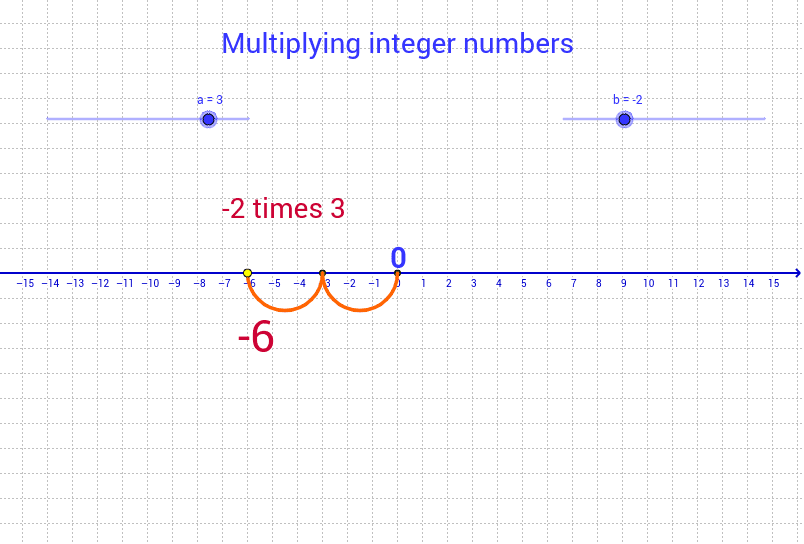
This interactive applet helps students grasp the sign rules of integer multiplication by visually demonstrating how positive and negative signs combine to produce results. The core mathematical concepts include integer operations, sign rules, and multiplication properties. Constructed with GeoGebra commands Arc, If, and Sequence, the applet creates objects such as A, B, and text lists (lista1, lista3) and text elements (texto1‑texto4) to dynamically generate and display multiplication outcomes. It is suitable for middle‑school and high‑school learners to reinforce integer multiplication rules.
GeoGebra Commands & Parameters
Arc((x - a / 2)^(2) = a / 2, (0, 0), (a, 0)) → cIf(b < 0, Sequence[(-a * n, 0), n, 0, -b], Sequence[(a * n, 0), n, 0, b]) → lista3Sequence(Semicircle[Element[lista3, n], Element[lista3, n + 1]], n, 1, abs(b)) → lista1
AI Drawing Prompt Reference
Create a visualization of integer multiplication rules, including the results of positive and negative numbers. First, draw a semicircle. Then, based on the input negative number b, generate a sequence of line segments pointing to the left, and for positive number b, generate a sequence of line segments pointing to the right, which will be enclosed by the semicircle to illustrate the sign rules of multiplication.
The prompt above was compiled from the original drawing commands and is for reference only.