
Drawing Histograms from Grouped Data Using Geometric Construction
Loading the math board and drawing, please wait…
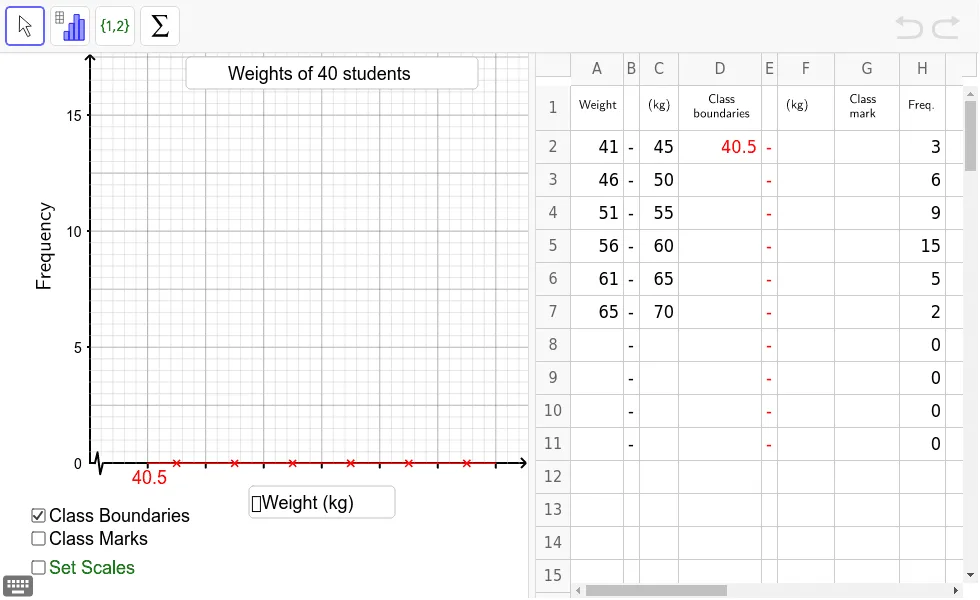
This example demonstrates how to draw a histogram to represent grouped (binned) data by constructing bar shapes whose heights correspond to the frequency (or frequency density) of each interval. The key ideas are binning with class intervals (group widths), statistical interpretation of frequencies, and visual encoding of a distribution through bar geometry. In construction, it uses GeoGebra commands and objects to build and label the graphical elements: If for conditional drawing rules per interval, Point for anchor locations, Polygon and PolyLine for outlining the bars, Sequence to generate repeated bar components across classes, Textfield for parameter/input control, and RotateText to present rotated labels cleanly. The resulting interactive setup helps teachers and students connect numerical grouped data with the histogram’s geometric representation, suitable for secondary school through early university probability & statistics lessons.
GeoGebra Commands & Parameters
If(C2 - A2 > 0, C2 - A2 + A3 - C2, 5) → kPoint(Ray[(1.5 * k, 0), (1.5 * k, 1)]) → Q1Point(Ray[(2.5 * k, 0), (2.5 * k, 1)]) → Q2Point(Ray[(3.5 * k, 0), (3.5 * k, 1)]) → Q3Point(Ray[(4.5 * k, 0), (4.5 * k, 1)]) → Q4Point(Ray[(5.5 * k, 0), (5.5 * k, 1)]) → Q5Point(Ray[(6.5 * k, 0), (6.5 * k, 1)]) → Q6Point(Ray[(7.5 * k, 0), (7.5 * k, 1)]) → Q7Point(Ray[(8.5 * k, 0), (8.5 * k, 1)]) → Q8Point(Ray[(9.5 * k, 0), (9.5 * k, 1)]) → Q9Point(Ray[(10.5 * k, 0), (10.5 * k, 1)]) → Q10Polygon((unitx, 0.3), (unitx, -0.3), (2.5 * unitx, -0.3), (2.5 * unitx, 0.3)) → poly1, a, b, c, dPolyLine((unitx, 0), (1.5 * unitx, h), (2 * unitx, -h), (2.5 * unitx, 0)) → eSequence(Polygon[(i * k, 0), ((i + 1) * k, 0), ((i + 1) * k, Element[list1, i]), (i * k, Element[list1, i])], i, 1, n - 1) → list2Sequence(Segment[(xmin + xint2 * i, ymax), (xmin + xint2 * i, ymin)], i, 1, (xmax - xmin) / xint2) → list3Sequence(Segment[(xmin, ymin + yint2 * i), (xmax, ymin + yint2 * i)], i, 1, (ymax - ymin) / yint2) → list4Sequence(Sequence[Segment[(xint2 * (j - 1) + xint1 * i, ymax), (xint2 * (j - 1) + xint1 * i, ymin)], i, 1, 4], j, 1, ceil(xmax / xint2)) → list5Sequence(Sequence[Segment[(xmin, (j - 1) * yint2 + yint1 * i), (xmax, (j - 1) * yint2 + yint1 * i)], i, 1, 4], j, 1, ceil(ymax / yint2)) → list6Sequence(Segment[(k * i + 0.5 * k, 0), (k * i + 0.5 * k, (-h) / 2.5)], i, 1, n - 1) → list9Sequence(Segment[(k * i, 0), (k * i, (-h) / 2.5)], i, 1, n) → list8Textfield(text23) → inputBox2Textfield(text24) → inputBox4Textfield(yint1') → inputBox1Textfield(xint1') → inputBox3RotateText("Frequency", 90*°) → text12
AI Drawing Prompt Reference
Create a histogram for grouped (binned) data using geometric construction. First, generate a set of vertical bar positions across consecutive class intervals using the given bin width and the number of intervals, and define a height parameter for each class corresponding to frequency (or frequency density). Draw the outline of one bar using polygon-like shapes for the top and side boundaries, plus polyline-style edges to form the bar contour. Then repeat/copy this bar construct horizontally for all classes so that every bar shares the same baseline and rises to a height determined by the corresponding frequency value. Add a rotated label reading “Frequency” at about a 90° orientation.
The prompt above was compiled from the original drawing commands and is for reference only.