
Adding and Subtracting Integers Geometrically
Loading the math board and drawing, please wait…
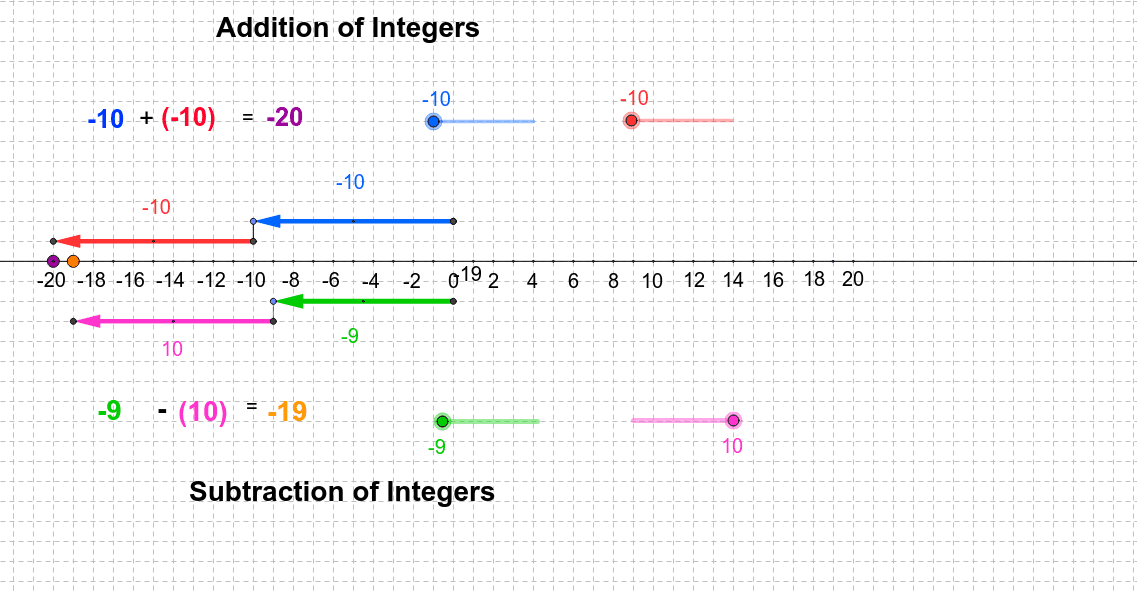
This example demonstrates the addition and subtraction of integers through geometric figures, providing a visual representation of the operations. Key mathematical concepts include integers and their addition and subtraction. It utilizes commands such as Line, Point, Circle, Vector, Translate, Segment, and Midpoint in GeoGebra. Suitable for middle school mathematics education, aiding students in understanding the geometric meaning of integer addition and subtraction.
GeoGebra Commands & Parameters
Line(A, B) → aPoint(a) → CCircle(C, 4) → kOrthogonalLine(C, a) → dIntersect(k, d, 1) → J_1Circle(C, 2) → pIntersect(p, d) → I_1, L_5Vector(L_5, P_2) → u_1Circle(M_1, 1) → qCircle(L_5, 1) → gIntersect(g, d, 1) → N_1OrthogonalLine(N_1, d) → iIntersect(q, i) → O_1, P_1Intersect(p, d, 1) → M_2Vector(I_1, L_1) → vIntersect(k, d, 2) → R_1Circle(R_1, N_1) → rIntersect(r, d, 2) → S_1Circle(M_3, 1) → q_1Intersect(q_1, i_1, 1) → N_2Translate(N_2, v) → Q_2Point(a) → DPoint(a) → EPoint(a) → FPoint(a) → GPoint(a) → HPoint(a) → IPoint(a) → JPoint(a) → KPoint(a) → LPoint(a) → MPoint(a) → NPoint(a) → OPoint(a) → PPoint(a) → QPoint(a) → RPoint(a) → SPoint(a) → TPoint(a) → UPoint(a) → VPoint(a) → WPoint(a) → YPoint(a) → ZPoint(a) → A_1Point(a) → B_1Point(a) → C_1Point(a) → D_1Point(a) → E_1Point(a) → F_1Point(a) → G_1Point(a) → H_1OrthogonalLine(I_1, d) → eOrthogonalLine(L_5, d) → hOrthogonalLine(J_1, d) → fVector(J_1, K_1) → uVector(L_5, M_1) → wTranslate(O_1, u_1) → Q_1Vector(O_1, Q_1) → zOrthogonalLine(S_1, d) → jVector(S_1, T_1) → lSegment(J_1, S_1) → mSegment(M_1, O_1) → tOrthogonalLine(K_1, a) → nIntersect(n, a) → U_1OrthogonalLine(L_1, a) → sOrthogonalLine(T_1, a) → a_1Intersect(s, a) → W_1Intersect(a_1, a) → Y_1Segment(T_1, Y_1) → c_1Segment(L_1, W_1) → d_1Segment(I_1, L_1) → b_2Segment(J_1, K_1) → e_1Segment(L_5, M_1) → f_1Segment(T_1, S_1) → h_1Midpoint(J_1, K_1) → Z_1Midpoint(I_1, L_1) → A_2Midpoint(L_5, M_1) → B_2Midpoint(Q_1, O_1) → C_2Point(a) → V_1Point(a) → D_2Point(a) → E_2Point(a) → F_2Point(a) → G_2Point(a) → H_2Point(a) → I_2Point(a) → J_2Point(a) → K_2Point(a) → L_2Circle(M_2, 1) → g_1Vector(M_2, M_3) → w_1Vector(N_2, Q_2) → z_1Midpoint(Q_2, N_2) → C_3Midpoint(M_2, M_3) → O_2Segment(N_2, M_4) → j_1OrthogonalLine(P_2, a) → s_1OrthogonalLine(R_2, a) → k_1OrthogonalLine(P_2, a) → l_1Mirror(Q_1, O_1) → T_2Vector(O_1, T_2) → v_1Midpoint(T_2, O_1) → U_2OrthogonalLine(T_2, a) → m_1Intersect(m_1, a) → S_2
AI Drawing Prompt Reference
Draw a horizontal line with two fixed points. Choose a point on the line as the center and draw two concentric circles with radii 4 and 2. Construct a perpendicular line through the center intersecting both circles at several points. Use these intersections to create vectors and translate points, drawing small circles to generate evenly spaced points above and below the line. Finally, place many points along the line as integer markers, forming a geometric number line that visually represents integer addition and subtraction.
The prompt above was compiled from the original drawing commands and is for reference only.