
Add, subtract, multiply complex numbers
Loading the math board and drawing, please wait…
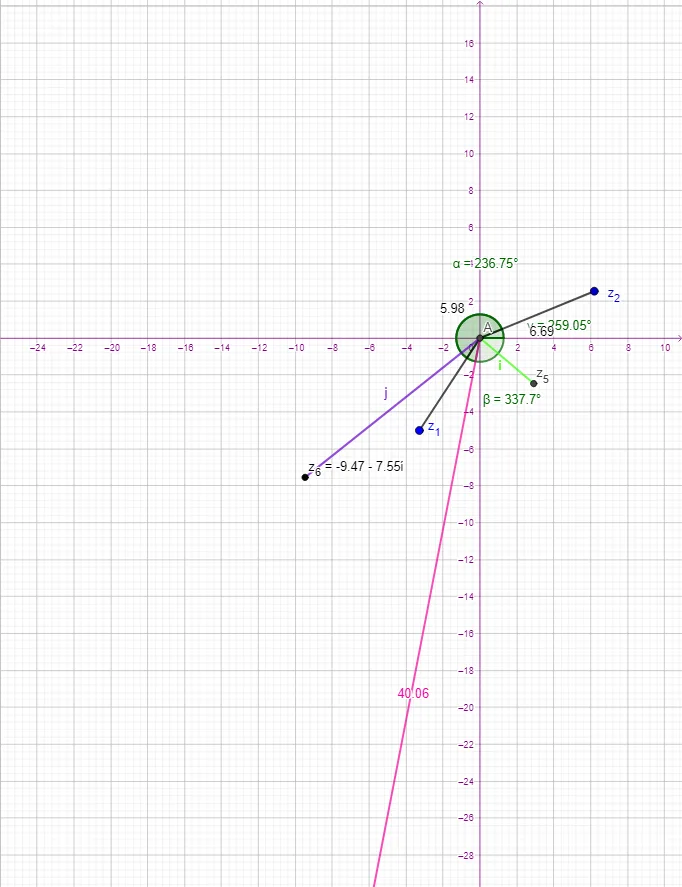
This example demonstrates how to perform addition, subtraction, and multiplication of complex numbers using GeoGebra. Key mathematical concepts include basic operations with complex numbers. By examining the commands used, such as Intersect, Segment, and Angle, one can understand how to geometrically represent and operate on complex numbers in GeoGebra. Suitable for middle school and above students or teachers.
GeoGebra Commands & Parameters
Intersect(xAxis, yAxis) → ASegment(A, z_{1}) → fSegment(A, z_{2}) → gSegment(A, z_4) → hAngle(xAxis, f) → αAngle(g, xAxis) → βAngle(xAxis, h) → γSegment(A, z_{5}) → iSegment(A, z_{6}) → j
AI Drawing Prompt Reference
Draw a geometric figure to demonstrate addition, subtraction, and multiplication of complex numbers. First, establish the origin A as the center. Then, connect the complex number points z1, z2, z4, z5, and z6 to A to form line segments f, g, h, i, and j. Next, calculate the angles α, β, and γ between the x-axis and these line segments to represent angle relationships in complex number operations. The figure should clearly show the geometric connections between these points, segments, and angles, suitable for teaching demonstrations.
The prompt above was compiled from the original drawing commands and is for reference only.