
Acute and Obtuse Angle Relationships on the Unit Circle
Loading the math board and drawing, please wait…
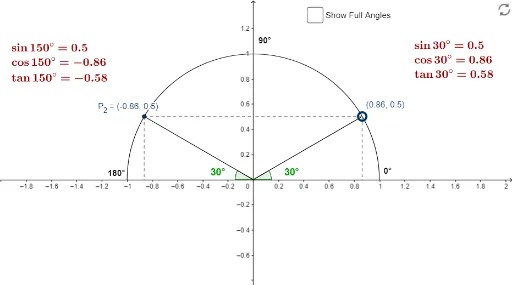
This example demonstrates the relationship between angles in different quadrants by dragging points on the unit circle, noting the x and y coordinate values. It involves core math concepts like the unit circle, coordinate geometry, and trigonometric function values. GeoGebra commands used include Point, Arc, Intersect, Segment, and Angle. Suitable for high school students to understand the connection between trigonometric functions, the unit circle, and quadrant properties.
GeoGebra Commands & Parameters
Point(c) → APoint(c) → BPoint(c) → CPoint(c) → DArc(c, A, B) → quad1Point(quad1) → P_1Intersect(xAxis, yAxis) → ESegment(P_1, E) → aAngle(P_1, E, A) → αSegment(P_1, Y_1) → bSegment(P_1, X_1) → dArc(c, B, C) → quad2Segment(P_2, E) → eAngle(A, E, P_2) → βSegment(P_2, X_2) → fSegment(P_2, Y_2) → gPoint(e) → HPoint(a) → IAngle(X_1, O, P_1) → εAngle(X_2, O, P_2) → ζ
AI Drawing Prompt Reference
Draw two arcs on a unit circle, marking a point in each quadrant. Connect these points to the intersection of the coordinate axes, forming two line segments. Measure the angles formed by one point with the coordinate axes and the center of the circle, and by the other point with the coordinate axes and the center. Finally, connect the first point to the intersection with the x-axis and measure the angles formed by this point with the x-axis and the center of the circle, as well as those formed by the second point with the x-axis and the center.
The prompt above was compiled from the original drawing commands and is for reference only.