
Activity #2: The Basics of Tangent
Loading the math board and drawing, please wait…
In collections
Sections 9.4 and 9.5__3 Trig Ratios
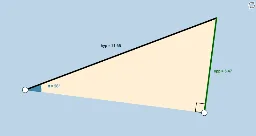
This example demonstrates the application of the AA~ similarity theorem for right triangles through interactive manipulation, highlighting that the ratios of any two sides remain constant. Core concepts include right triangle similarity, side ratio constancy, and trigonometric functions. Constructed using GeoGebra commands like Ray, OrthogonalLine, Point, Rotate, Angle, Intersect, Segment, and Polygon. Suitable for high school trigonometry instruction.
GeoGebra Commands & Parameters
Ray(A, C) → a_1OrthogonalLine(C, a_1) → bPoint(b) → C_1Ray(C, C_1) → cRotate(C, β, A) → B'Angle(C, A, B') → αRay(A, B') → dIntersect(c, d) → DSegment(A, D) → hypSegment(A, C) → adjSegment(C, D) → oppAngle(D, C, A) → γPolygon(A, C, D) → poly1, d_1, a, b_1
AI Drawing Prompt Reference
Draw a right triangle with one leg as a reference line. From the right angle vertex, draw a ray and then a perpendicular line to it, marking a point on the perpendicular. Connect this point to the right angle vertex to form another triangle. Rotate the second triangle around the right angle vertex by a certain angle, and find the intersection point of the extended lines. Connect the points to highlight the original and rotated triangles, emphasizing the similarity and the constant ratio of corresponding sides, showcasing trigonometric functions.
The prompt above was compiled from the original drawing commands and is for reference only.