
A Translation and a Translation: Sequential Polygon Translation
Loading the math board and drawing, please wait…
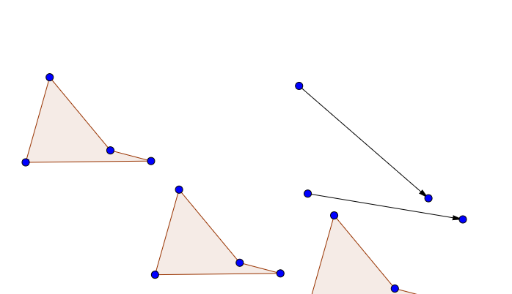
①This GeoGebra example demonstrates the effect of applying two successive translations to a polygon, showing how the shape moves along given vectors. ②Core mathematical concepts include translation transformations in plane geometry, vectors, polygons, perimeter, and basic linear equations; the tags also mention boxplot and stochastic process, suggesting possible extensions to statistics or random contexts. ③Construction highlights: using the Polygon command to create polygon poly1, the Vector command to define translation vectors u and v, and the Translate command to translate the polygon and its edges, producing translated copies poly1' and poly1'' while retaining original vertices A, B, C, D. ④Suitable for middle/high school geometry or introductory linear algebra, this example helps students grasp the geometric meaning of translation, vector addition, and composition of transformations, and can serve as dynamic courseware.
GeoGebra Commands & Parameters
Polygon(A, B, C, D) → poly1, a, b, c, dVector(E, F) → uVector(G, H) → vTranslate(A, u) → A'Translate(B, u) → B'Translate(C, u) → C'Translate(D, u) → D'Polygon(A', B', C', D') → poly1', a', b', c', d'Translate(A', v) → A''Translate(B', v) → B''Translate(C', v) → C''Translate(D', v) → D''Polygon(A'', B'', C'', D'') → poly1'', a'', b'', c'', d''
AI Drawing Prompt Reference
Draw a quadrilateral, then define two translation vectors. Translate the quadrilateral along the first vector to create a second quadrilateral, then translate that new quadrilateral along the second vector to create a third. Keep the original vertices visible and show all translated edges, so that the original, first-translated, and second-translated quadrilaterals appear together, illustrating the effect of successive translations.
The prompt above was compiled from the original drawing commands and is for reference only.