
A Regular Pentagon and Its Ratios
Loading the math board and drawing, please wait…
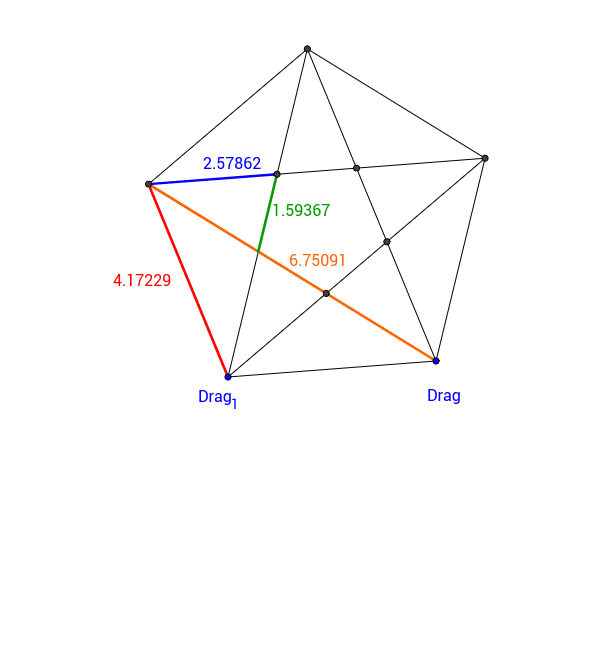
① This example demonstrates a regular pentagon and the ratios among its internal segments, such as diagonals, sides, and intersecting lines, which remain constant as the figure is dynamically adjusted. ② Core mathematical concepts include properties of regular polygons, the golden ratio, similar triangles, and invariance of segment ratios. ③ Construction highlights: using GeoGebra commands Polygon to create the regular pentagon poly1, Segment to connect vertices and intersection points (e.g., C, D, E), and Intersect to generate internal points (e.g., F, G, H); multiple segments (a through s) are defined for measuring and computing ratios; dragging point Drag_1 changes the size but preserves the pentagon's regularity. ④ Suitable for middle or high school geometry classes to explore polygon properties, ratio relationships, and the golden ratio, as well as for inquiry-based learning to visualize mathematical invariants.
GeoGebra Commands & Parameters
Polygon(Drag_1, Drag, 5) → poly1, a, b, c, d, e, C, D, ESegment(Drag, D) → fSegment(D, Drag_1) → gSegment(Drag_1, C) → hSegment(C, E) → iSegment(E, Drag) → jSegment(D, Drag_1) → kIntersect(k, i) → FIntersect(f, i) → GIntersect(f, h) → HIntersect(h, j) → IIntersect(j, k) → JSegment(E, F) → lSegment(F, J) → mSegment(E, Drag_1) → nSegment(E, D) → pSegment(C, D) → qSegment(C, Drag) → rSegment(Drag, Drag_1) → s
AI Drawing Prompt Reference
Draw a regular pentagon and display its internal segments, including diagonals, sides, and connecting lines between intersection points. Change the size of the pentagon by dragging a point while maintaining its regularity. Focus on showing the ratio relationships among these internal segments, such as the proportions between diagonals, sides, and the triangles formed by intersecting lines, which remain constant as the figure is adjusted.
The prompt above was compiled from the original drawing commands and is for reference only.