
A Ray in a Corner
Loading the math board and drawing, please wait…
In collections
Light
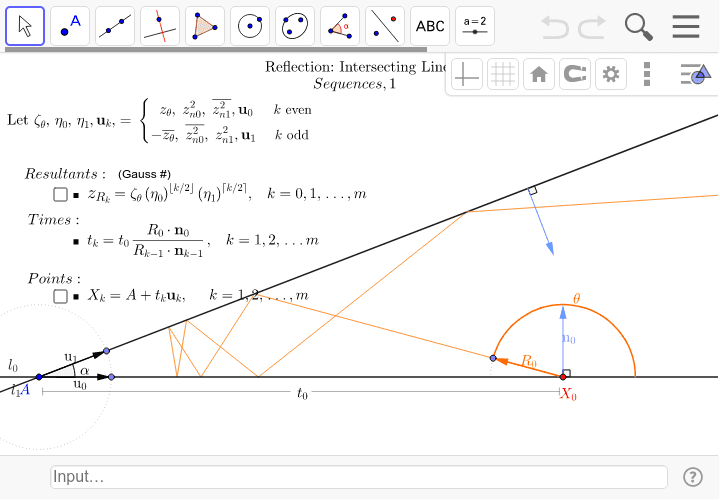
This example demonstrates the path of a ray of light caught between two infinite, intersecting mirrors. It illustrates the reflection phenomenon, involving core math concepts like the law of reflection, angles, vectors, and geometric constructions. Constructed using GeoGebra commands such as Circle, Point, Vector, Line, Ray, Angle2, Angle, Arc1b, Sequence, Zip, Append, PolyLine, SegmentLabel1. Suitable for high school students learning about geometric reflections and vector concepts.
GeoGebra Commands & Parameters
Circle(A, 1) → cPoint(c) → BVector(A, B) → u0Line(A, B) → aRay(A, B) → l1Point(c) → CVector(A, C) → u1Line(A, C) → bAngle2(B, A, C) → αAngle(B, A, C) → α''Point(l1) → X0Angle(X0 + u0, X0, X0 + n0) → βArc1b(X0, X0 + u0, X0 - u0, σ) → gPoint(g) → LVector(X0, L) → R0Arc1b(X0, X0 + u0, L, σ) → θAngle(aux1 + u1, aux1, aux1 + n1) → γSequence(k, k, 0, m) → kiZip(floor(k / 2), k, ki) → ckZip(ceil(k / 2), k, ki) → dkZip(Mod[ki + 1, 2], ki, ki) → k1Zip((zθ * k1) + (zθ' * k2), k1, k1, k2, k2) → ζθZip((zn0 * k1) + (zn0' * k2), k1, k1, k2, k2) → η0Zip((zn1' * k1) + (zn1 * k2), k1, k1, k2, k2) → η1Zip(Vector[((z * p^(c)) * q^(d))], z, dk, ζθ, p, η0, c, ck, q, η1, d) → RkAppend(t0, Sequence[tm / ((Element[Rk, k] * Element[nrm, Mod[k, 2] + 1])), k, 1, m - 1]) → timesZip(A + (t * Element[{u0, u1}, Mod[k, 2] + 1]), t, times, k, ki) → XkZip(Vector[Xk, Xk + Rk], Xk, Xk, Vector[Rk], Rk) → ResultantsRay(Element[Xk, m], Vector[Element[Rk, m]]) → rayEndPolyLine(Xk) → rayPathSegmentLabel1(A, X0, -0.2, 0.15, 0.05, 0.05, 0.5) → pLBL_t, lbl_t
AI Drawing Prompt Reference
Draw two intersecting lines forming a corner, representing two mirrors meeting at a point. Place a unit circle centered at the intersection, with two points on the circle defining the mirror directions. From a point on one mirror, emit a ray that reflects repeatedly between the two mirrors, creating a polyline path. Each segment's direction follows the law of reflection, with angles marked. Show the complete reflected ray path and the final outgoing ray direction.
The prompt above was compiled from the original drawing commands and is for reference only.