
90-Degree Rotations of Lines
Loading the math board and drawing, please wait…
In collections
Exploring Transformations of Lines
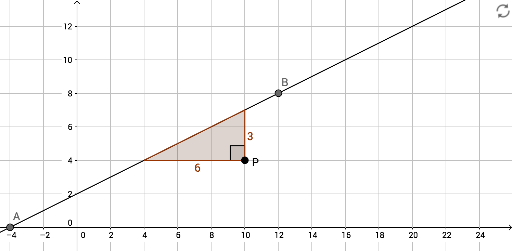
This GeoGebra example demonstrates the effect of rotating lines by 90 degrees around a point, showing how the rotated lines interact with polygons and angles. The core mathematical concepts include rotation transformation, line equations, intersection points, and angle measurement. Construction uses GeoGebra commands such as Line, Intersect, Polygon, and Angle, with objects including lines G, j, i, points A, B, C, D, E, F, P, polygons poly1 and poly2, and auxiliary lines f, g, h. Suitable for middle school to high school students learning geometric transformations, and useful for teachers to visually explain rotation properties in class.
GeoGebra Commands & Parameters
Line(G, xAxis) → jLine(G, yAxis) → iLine(A, B) → fIntersect(j, f) → FIntersect(i, f) → EPolygon(G, E, F) → poly2, f_1, g_1, eLine(P, xAxis) → gLine(P, yAxis) → hIntersect(f, h) → CIntersect(f, g) → DPolygon(P, C, D) → poly1, d, p, cAngle(C, P, D) → α
AI Drawing Prompt Reference
Draw a coordinate plane with a point as a rotation center. Through this point, draw two lines parallel to the x-axis and y-axis. Choose two other points to define a slanted line. This slanted line intersects the two parallel lines, creating two intersection points. Form a polygon using the rotation center, these two intersection points, and the intercepts on the axes. Then, place another point elsewhere as a new rotation center, and draw two lines through it parallel to the axes. Let the original slanted line intersect these two new lines, producing two new intersection points. Use the new center and these points to form a second polygon. Finally, mark the angle between the two intersecting lines at the new center and display its measure. This shows how lines rotate 90 degrees around a point and interact with polygons and angles.
The prompt above was compiled from the original drawing commands and is for reference only.