
5-point conic spinning tangents
Loading the math board and drawing, please wait…
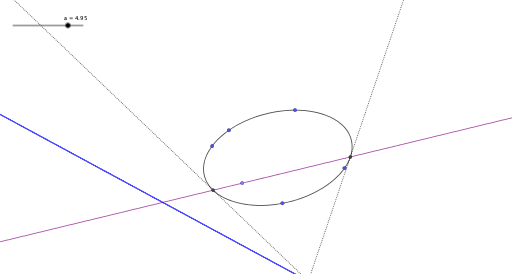
This example demonstrates the construction of rotating tangents to a conic using five points. Key mathematical concepts include conic sections, tangents, rotation, and optimization. The construction involves GeoGebra commands such as Conic, Circle, Rotate, Tangent, and Locus, with objects like points A to E and parameters c, f. It is suitable for high school students learning geometric construction and optimization problems.
GeoGebra Commands & Parameters
Conic(A, B, C, D, E) → cCircle(F, 1) → dPoint(d) → GRotate(G, a, F) → G'Line(F, G') → fIntersect(c, f, 2) → HIntersect(c, f, 1) → ITangent(H, c) → g,Tangent(I, c) → h,Intersect(g, h) → JLocus(J, a) → loc1
AI Drawing Prompt Reference
Draw a conic section defined by five points and show two rotating tangents. Start by plotting a conic using five points, then draw a circle centered at one of these points with a radius of 1. Rotate a point on the circle by a certain angle around the center, and connect the center to this rotated point to form a line. Find the two intersection points of this line with the conic. Draw the tangents to the conic at these points, and determine their intersection. Finally, plot the locus of this intersection point as it rotates around the circle's center to visualize the dynamic tangents.
The prompt above was compiled from the original drawing commands and is for reference only.