
3D Rotational Activity with Spline
Loading the math board and drawing, please wait…
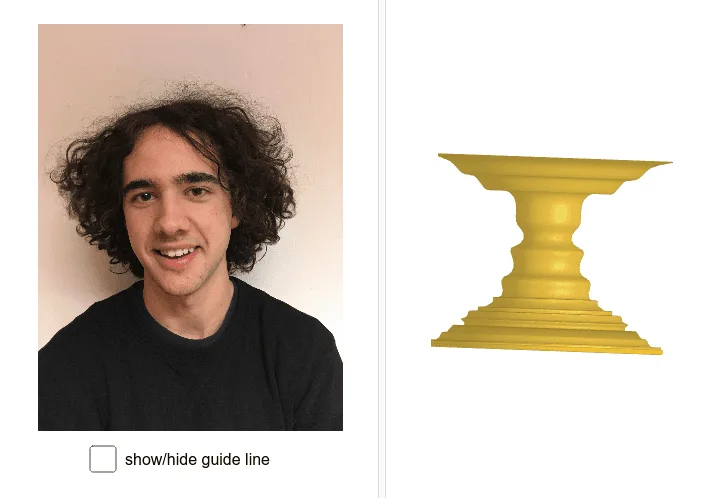
This example demonstrates 3D rotational activities using the Spline command to generate complex shapes. It involves core mathematical concepts such as 3D rotation, solid geometry, trigonometry, and spline curve applications. The construction utilizes commands like Spline, CurveCartesian, Surface, OrthogonalPlane, OrthogonalLine, Intersect, Segment, and Circle, as well as objects like T_5 to A, B_1 to B_3. It is suitable for high school and above students to explore and understand complex 3D geometric shapes and their generation processes, ideal for teaching demonstrations and geometric investigations.
GeoGebra Commands & Parameters
Spline({A, B, B_1, B_2, B_3, C, C_1, C_2, C_3, D, D_1, D_2, D_3, E, E_1, E_2, E_3, F, F_1, F_2, F_3, G, H, I, J, J_1, J_2, J_3, K, L, M, N, O, P, Q, R, S, T, T_1, T_2, T_3, T_4, T_5, U}, 3) → aCurveCartesian(a(t / d), t, 0, d) → cSurface(c, (2 * π), yAxis) → bOrthogonalPlane(U, yAxis) → eOrthogonalLine(U, yAxis) → fIntersect(f, yAxis) → VSegment(V, U) → gCircle(V, g, yAxis) → h
AI Drawing Prompt Reference
Create a 3D rotational activity example using a spline to generate complex shapes, demonstrating 3D rotation, solid geometry, trigonometry, and spline curve applications. Start by generating a spline through multiple points, then convert it into a 3D curve and use it to create a rotating surface. Next, construct an orthogonal plane and line, find their intersection, draw a segment connecting the intersection point to a specific point, and finally draw a circle centered at the intersection point with the segment as the radius.
The prompt above was compiled from the original drawing commands and is for reference only.