
3D Rotation of Triangle
Loading the math board and drawing, please wait…
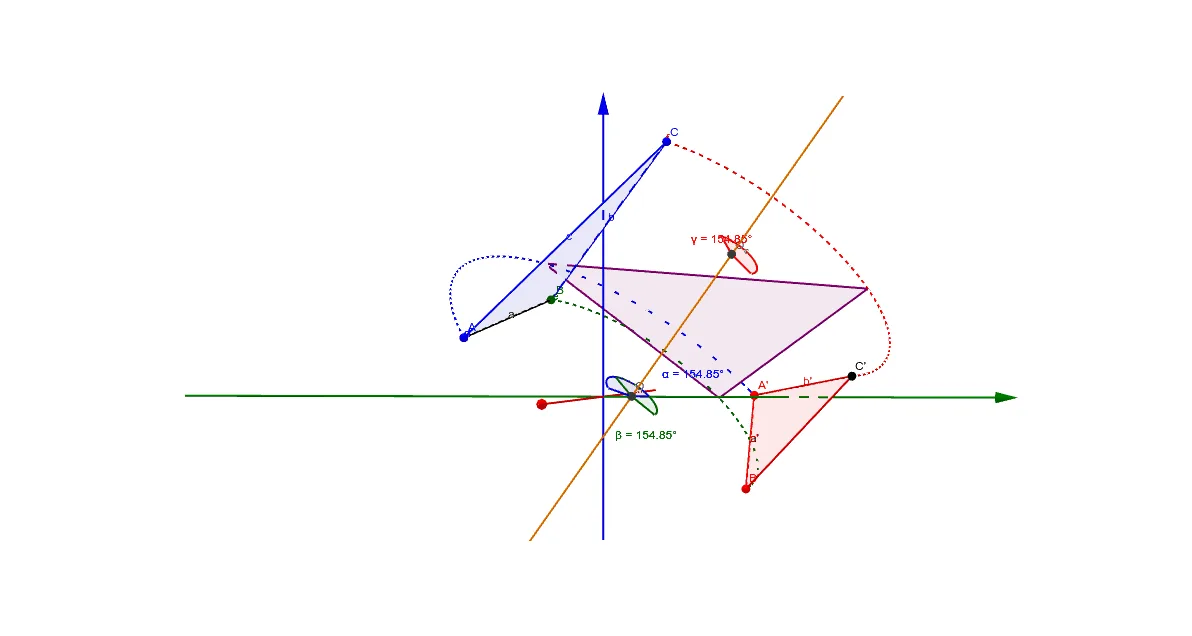
This example demonstrates how to rotate a triangle ABC in three dimensions. The key mathematical concepts include rotation transformation, coordinate geometry, and geometric construction. The construction involves using GeoGebra commands such as Rotate, Segment, Point, and IntersectPath to define the rotation center and transformed points. It is suitable for middle school students or high school students learning geometric transformations and graphical operations.
GeoGebra Commands & Parameters
Segment(A, B) → aPoint(IntersectPath[Plane[A, B, A'], Sphere[A', a]]) → B'IntersectPath(PlaneBisector[A, A'], PlaneBisector[B, B']) → iSegment(A', B') → a'Intersect(i, Plane[A, B, A']) → ORotate(C, Angle[A, O, A'], i) → C_1Polygon(A, B, C) → poly1, c_1, b, cRotate(C, (-Angle[A, O, A']), i) → C_2If(Distance[A, C] ≟ Distance[A', C_1], C_1, C_2) → C'Polygon(A', B', C') → poly2, c', a'_1, b'CircleArc(O, A, A') → dCircleArc(O, B, B') → eAngle(A, O, A') → αAngle(B, O, B') → βIntersect(i, OrthogonalPlane[C, i]) → O_cCircleArc(O_c, C, C') → fAngle(C, O_c, C') → γRotate(poly1, (t * α), i) → poly1'
AI Drawing Prompt Reference
Please draw a three-dimensional rotation of a triangle. Start with triangle ABC in 3D space. Define a rotation center O. Calculate rotation angles α and β. Draw the rotated triangle C'. Also, draw circular arcs d and e from O to A and B. Ensure the figure illustrates the concept of geometric transformation.
The prompt above was compiled from the original drawing commands and is for reference only.