
3D Parametric Paths #3
Loading the math board and drawing, please wait…
In collections
intersection: surface-surface, curve-curve
intersection: surface-surface, curve-curve
intersection: surface-surface, curve-curve
intersection: surface-surface, curve-curve
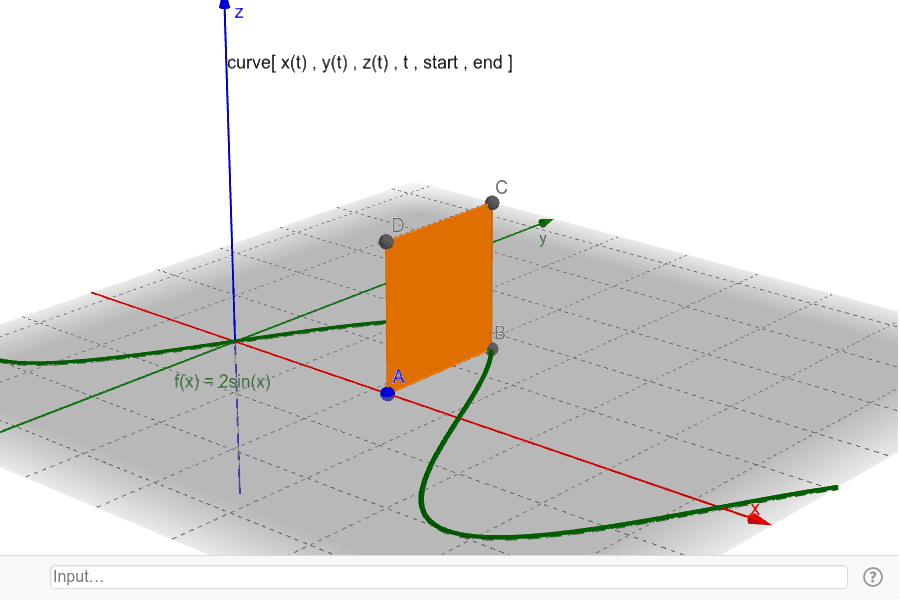
This example demonstrates 3D parametric paths. Key mathematical concepts include parametric equations and solid geometry. Using GeoGebra commands such as Point, Polygon, and Textfield, complex 3D paths can be constructed. Suitable for high school and above students or teachers for teaching or research.
GeoGebra Commands & Parameters
Point(Segment[(0, 0, 0), (4, 0, 0)]) → APolygon(A, B, C, D) → poly1, a, b, c, dTextfield(xx) → InputBox1Textfield(yy) → InputBox2Textfield(zz) → InputBox3Textfield(startt) → InputBox4Textfield(endt) → InputBox5Point(zAxis) → F
AI Drawing Prompt Reference
Draw a 3D parametric path in space, showing its start and end points, and label the coordinate axes. Begin by drawing a line segment along the x-axis, then construct a rectangle based on this segment. Next, add four text boxes to input the parametric equations for x, y, z, and the start and end values of parameter t. Finally, mark a point on the z-axis to illustrate the relationship between the curve and the coordinate axes.
The prompt above was compiled from the original drawing commands and is for reference only.