
3D Linear Programming Problem
Loading the math board and drawing, please wait…
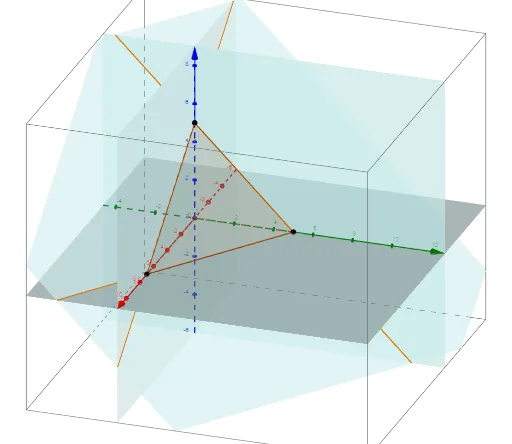
This is a 3D linear programming problem, demonstrating the basic concepts of linear programming through the construction of planes, intersections, and other geometric objects. It uses commands like Plane, IntersectPath, Intersect, and Polygon in GeoGebra. Suitable for high school mathematics education, particularly in coordinate geometry and linear programming courses.
GeoGebra Commands & Parameters
Plane(A, B, C) → aIntersectPath(a, b) → fIntersectPath(a, d) → gIntersectPath(a, e) → hIntersectPath(c, d) → iIntersectPath(c, e) → jIntersectPath(c, b) → kIntersectPath(c, a) → lIntersect(xAxis, zAxis) → DPolygon(A, D, C) → t1, c_1, a_1, d_1Polygon(D, B, C) → t2, c_2, d_2, b_1Polygon(A, D, B) → t3, b_2, a_2, d_3Polygon(C, D, B) → t4, b_3, c_3, d_4
AI Drawing Prompt Reference
Create a 3D geometric figure for a linear programming problem. Start with a 3D coordinate system, choose three points on the positive x, y, and z axes, forming a tetrahedron. Construct three planes through pairs of these points, and add a fourth plane intersecting them, creating several intersection lines. Then connect the intersection points with polygons to form four triangular faces, resulting in a closed polyhedron that illustrates the feasible region and constraint planes in linear programming.
The prompt above was compiled from the original drawing commands and is for reference only.