
3D Block with Two Holes - Composite Figures
Loading the math board and drawing, please wait…
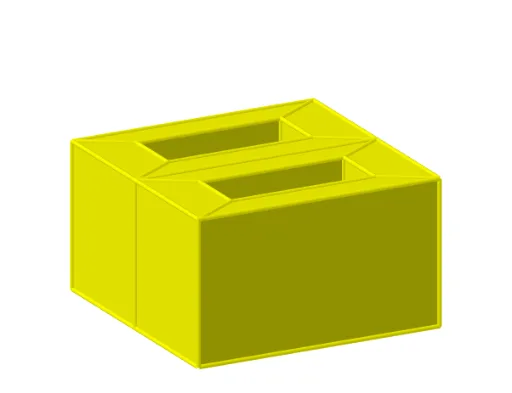
This example demonstrates a 3D block with two holes, focusing on composite figures. Key math concepts include solid geometry, volume calculation, geometric transformations, and polygon area. It uses GeoGebra commands like Textfield, Centroid, Polygon, and objects such as input boxes and sliders to dynamically visualize the figure. Suitable for high school students learning about solid geometry, composite shapes, and spatial reasoning.
GeoGebra Commands & Parameters
Textfield(Lx) → InputBox1Textfield(Ly) → InputBox2Textfield(Lz) → InputBox3Textfield(LxI) → InputBox4Textfield(LyI) → InputBox5Centroid(Polygon[C, D, I, J]) → MCentroid(Polygon[B, A, I, J]) → NCentroid(Polygon[G, H, K, L]) → OCentroid(Polygon[F, E, K, L]) → PPolygon({B, F_1, G_1, J}) → q1Polygon({G_1, J, I, H_1}) → q2Polygon({I, H_1, E_1, A}) → q3Polygon({E_1, A, B, F_1}) → q4Polygon({J, I, Q, R}) → q5Polygon({J, R, S, C}) → q6Polygon({S, C, D, T}) → q7Polygon({D, T, Q, I}) → q8Polygon({F, E, A_1, B_1}) → q9Polygon({F, B_1, C_1, L}) → q10Polygon({C_1, L, K, D_1}) → q11Polygon({K, D_1, A_1, E}) → q12Polygon({K, L, V, U}) → q13Polygon({L, G, W, V}) → q14Polygon({G, W, Z, H}) → q15Polygon({Z, H, K, U}) → q16Polygon({F, L, J, B}) → q17Polygon({L, J, C, G}) → q18Polygon({B, A, E, F}) → q19Polygon({C_1, B_1, F_1, G_1}) → q20Polygon({B_1, F_1, E_1, A_1}) → q21Polygon({C_1, D_1, H_1, G_1}) → q22Polygon({D_1, A_1, E_1, H_1}) → q23Polygon({S, R, V, W}) → q24Polygon({R, V, U, Q}) → q25Polygon({S, T, Z, W}) → q26Polygon({T, Z, U, Q}) → q27Polygon({A, E, K, I}) → q28Polygon({G, C, D, H}) → q29Polygon({D, H, K, I}) → q30
AI Drawing Prompt Reference
Draw a 3D block with two circular holes, demonstrating composite figures. Start by constructing the outer surface of the block, then create the inner surfaces of the two holes, ensuring accurate shape and position. Use sliders to dynamically adjust the dimensions of the block and holes, and label the centroids of key points. Finally, present the overall 3D effect of the composite geometric figure.
The prompt above was compiled from the original drawing commands and is for reference only.