
3.4.1(b) Museo de Onda: Azulejo 1
Loading the math board and drawing, please wait…
In collections
geometriadinamica.es
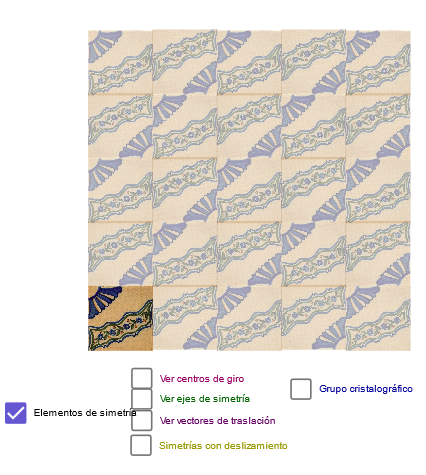
This example demonstrates how to use GeoGebra to draw 3.4.1(b) Museo de Onda Azulejo 1. The core mathematical concepts involved include linear equations, symmetries, and rational numbers. By using commands such as Line, Point, OrthogonalLine, Intersect, Midpoint, Mirror, Min, Vector, complex geometric shapes can be constructed. Suitable for high school mathematics education and learning.
GeoGebra Commands & Parameters
Line(A, B) → bLine(G, b) → ePoint(e) → JOrthogonalLine(J, e) → hOrthogonalLine(G, e) → fPoint(f) → HOrthogonalLine(H, f) → gIntersect(g, h) → EMidpoint(E, H) → IMidpoint(I, E) → B_1Midpoint(G, J) → DMidpoint(J, E) → FMidpoint(H, G) → KMidpoint(D, I) → LMidpoint(K, L) → MMidpoint(L, F) → NMidpoint(F, J) → OMidpoint(J, D) → PMidpoint(G, D) → QMidpoint(K, G) → RMidpoint(Q, M) → SMidpoint(L, D) → TMidpoint(P, N) → UMidpoint(F, E) → VMidpoint(K, H) → WMidpoint(W, V) → ZMidpoint(H, I) → A_1Midpoint(N, B_1) → C_1Midpoint(Z, W) → D_1Midpoint(D, U) → E_1Midpoint(U, J) → F_1Midpoint(T, Q) → G_1Midpoint(S, G) → H_1Midpoint(S, K) → I_1Midpoint(M, T) → J_1Midpoint(T, N) → K_1Midpoint(N, O) → L_1Midpoint(F, C_1) → M_1Midpoint(C_1, L) → N_1Midpoint(L, D_1) → O_1Midpoint(D_1, K) → P_1Midpoint(D_1, I) → R_1Midpoint(I, C_1) → S_1Midpoint(C_1, E) → T_1Mirror(F_1, h) → U_1Mirror(L_1, h) → V_1Mirror(M_1, h) → W_1Mirror(T_1, h) → Z_1Mirror(B_1, h) → A_2Line(Q, A_2) → dLine(F, d) → iLine(C_1, d) → kLine(S_1, k) → lLine(R_1, L_1) → jLine(D_1, j) → mLine(M, j) → nLine(I, j) → pLine(S, A_1) → tLine(I, T) → a_1Line(U, B_1) → b_1Line(E_1, N_1) → c_1Line(F_1, M_1) → d_1Line(G_1, R_1) → e_1Line(W_1, P_1) → g_1Point(a_1) → F_2Mirror(F_2, m) → L_2Mirror(F_2, m) → M_2Point(b) → A1Min(90, ((a - 1) * 90)) → r1Line(G_1, O_1) → l_1OrthogonalLine(G_1, l_1) → m_1OrthogonalLine(J_1, l_1) → q_1OrthogonalLine(O_1, l_1) → r_1OrthogonalLine(R_1, l_1) → s_1OrthogonalLine(E_1, m_1) → t_1OrthogonalLine(F_1, m_1) → a_2Point(a_1) → COrthogonalLine(F_2, d) → i_1OrthogonalLine(C, d) → j_1Min(180, ((a - 1) * 180)) → r2Min(270, ((a - 1) * 270)) → r3Min(180, ((a - 5.5) * 180)) → r4Midpoint(H_1, G_1) → B_2Midpoint(G_1, E_1) → C_2Midpoint(E_1, F_1) → D_2Midpoint(F_1, U_1) → E_2Midpoint(O, U) → G_2Midpoint(U, T) → H_2Midpoint(T, S) → I_2Midpoint(S, R) → J_2Midpoint(I_1, J_1) → K_2Midpoint(J_1, K_1) → N_2Midpoint(K_1, L_1) → O_2Midpoint(L_1, V_1) → P_2Midpoint(F, N) → Q_2Midpoint(N, L) → R_2Midpoint(L, M) → S_2Midpoint(M, K) → T_2Midpoint(P_1, O_1) → U_2Midpoint(O_1, N_1) → V_2Midpoint(N_1, M_1) → W_2Midpoint(M_1, W_1) → Z_2Midpoint(V, C_1) → A_3Midpoint(C_1, Z) → B_3Midpoint(Z, D_1) → C_3Midpoint(D_1, W) → D_3Mirror(pic1, D_3) → pic1'Mirror(pic1', T_2) → pic1''Mirror(pic1'', J_2) → pic1'''Mirror(J_2, H_1) → E_3Mirror(U_2, D_1) → F_3Mirror(V_2, Z) → G_3Mirror(W_2, C_1) → H_3Mirror(Z_2, V) → I_3Mirror(pic1''', E_3) → pic2Mirror(pic1, F_3) → pic1'_1Mirror(pic1'_1, G_3) → pic3Mirror(pic3, H_3) → pic3'Mirror(pic3', I_3) → pic3''Mirror(pic1'_1, C_3) → pic4Mirror(pic4, S_2) → pic4'Mirror(pic4', I_2) → pic4''Mirror(pic4'', C_2) → pic4'''Mirror(pic4', N_2) → pic4''_1Mirror(pic4, V_2) → pic4'_1Mirror(pic4'_1, W_2) → pic5Mirror(pic5, Z_2) → pic5'Mirror(pic4''_1, O_2) → pic6Mirror(pic6, P_2) → pic6'Mirror(pic4''', D_2) → pic7Mirror(pic7, E_2) → pic7'Mirror(B_2, Q) → J_3Mirror(pic2, J_3) → pic2'Mirror(H_2, E_1) → K_3Mirror(G_2, F_1) → L_3Mirror(L_3, J) → M_3Mirror(pic7', M_3) → pic7''Mirror(pic7, L_3) → pic7'_1Mirror(pic4''', K_3) → pic8Midpoint(E_3, K_3) → Q_1Vector(K_2, V_2) → uVector(K_2, C_2) → w
AI Drawing Prompt Reference
Draw a geometric pattern starting with a line segment, then create points on it and construct two perpendicular lines. Find the intersections of these lines and calculate multiple midpoints. Connect these midpoints to form new segments, and use symmetry operations like mirroring to create a complex geometric design. The final image should display a symmetrical structure made of lines and midpoints, illustrating mathematical concepts such as linear equations, symmetry, and rational numbers.
The prompt above was compiled from the original drawing commands and is for reference only.