
2D Vectors and Polygon Construction
Loading the math board and drawing, please wait…
In collections
Geogebra Investigations
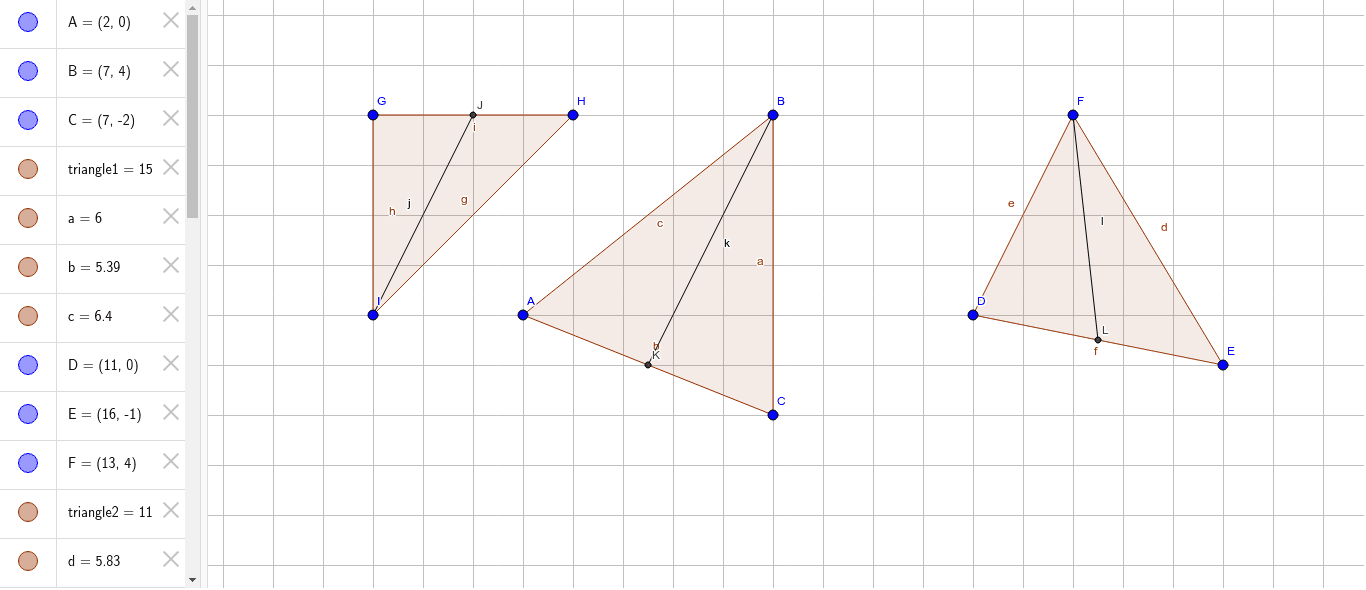
This example demonstrates how to construct polygons using 2D vectors and calculate their areas. The core math concepts involved include vector operations, polygon construction, and area calculation. Key GeoGebra commands used are Polygon, Midpoint, Segment, and Area to illustrate geometric properties through triangle and vector relationships. Suitable for high school mathematics teaching to understand the relationship between vectors and polygons.
GeoGebra Commands & Parameters
Polygon(A, B, C) → triangle1, c, a, bPolygon(D, E, F) → triangle2, f, d, ePolygon(G, H, I) → triangle3, i, g, hMidpoint(i) → JMidpoint(b) → KMidpoint(f) → LSegment(J, I) → jSegment(K, B) → kSegment(L, F) → lArea(G, J, I) → triangle1GJIArea(J, H, I) → triangle1JHIArea(B, A, K) → triangle2BAKArea(B, K, C) → triangle2BKCArea(F, D, L) → triangle3FDLArea(F, L, E) → triangle3FLE
AI Drawing Prompt Reference
Draw two triangles and three line segments to illustrate vector relationships. Start by creating two triangles, then find the midpoints of the vertices of the three triangles, and connect each midpoint to the corresponding vertex to form three line segments. Next, calculate the areas of six smaller triangles and color them differently to visually demonstrate the calculation of areas related to vectors and polygons.
The prompt above was compiled from the original drawing commands and is for reference only.