
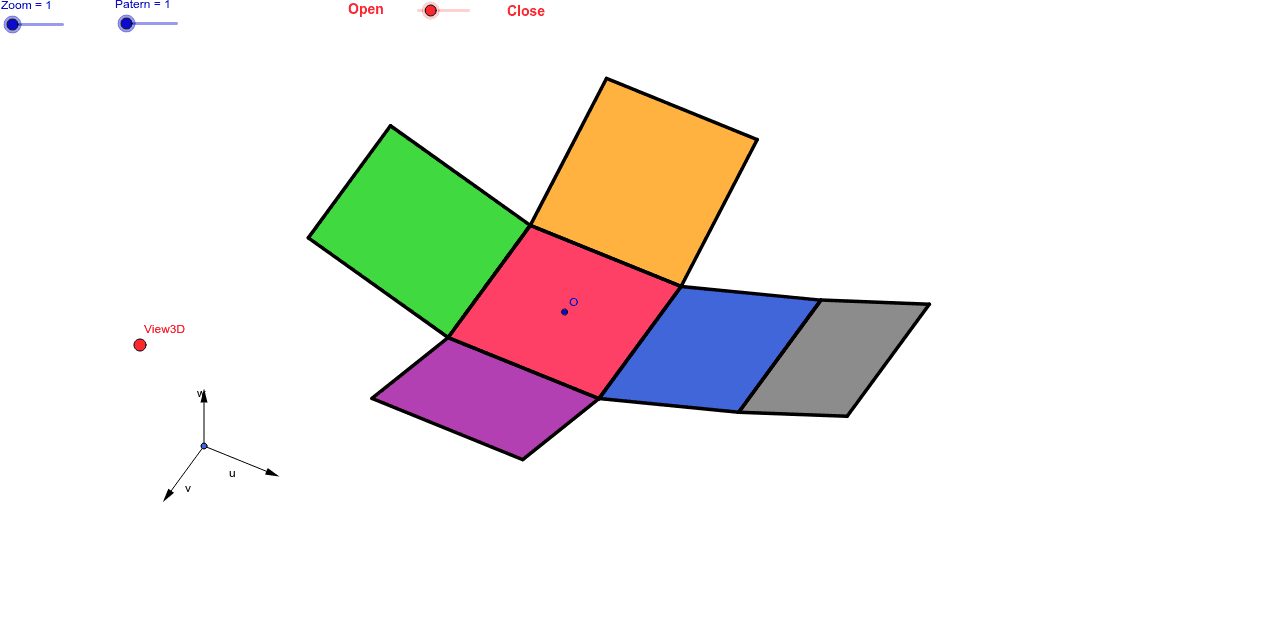
11 Patterns of the Cube: Interactive 3D Demonstration
Loading the math board and drawing, please wait…
This GeoGebra example demonstrates 11 geometric patterns or transformations of a cube, allowing interactive observation via sliders and 3D viewpoint adjustments. Core math concepts include solid geometry, transformations like reflection and translation, and trigonometric parameterization. Construction highlights: Utilizes commands such as Vector for vectors, OrthogonalLine for perpendicular lines, Polygon for polygons, Midpoint for midpoints, Translate for translation, Segment for segments, and Mirror for mirroring; key objects include View3D for 3D visualization and trigonometric variables like sinphi and cosphi for dynamic angle control. Suitable for high school or university students studying solid geometry and geometric transformations.
GeoGebra Commands & Parameters
Vector(B_1, X) → uVector(B_1, Z) → wOrthogonalLine(View3D, yAxis) → a_1OrthogonalLine(View3D, xAxis) → b_1Vector(B_1, Y) → vPolygon(L, K, N, M) → poly1, l, k_1, n, mPolygon(K, P, Q, N) → poly2, k_2, p, q, n_1Polygon(L, M, S, R) → poly3, l_1, m_1, s, rPolygon(N, V, W, M) → poly4, n_2, v_1, w_1, m_2Polygon(K, T, U, L) → poly5, k_3, t, u_1, l_2Polygon(B, Q, P, A) → poly6, b_2, q_1, p_1, a_2Midpoint(R, M) → DTranslate(S, Vector[-(2.0 * v)]) → S'Segment(S, C) → eTranslate(M, Vector[-(2.0) * v]) → M'Segment(M, E) → fSegment(E, C) → hTranslate(N, Vector[-(2.0) * v]) → N'Translate(Q, Vector[-(2.0) * v]) → Q'_1Segment(Q, F) → iSegment(N, G) → jSegment(G, F) → d_1Translate(Q, Vector[-(2.0) * v]) → Q'_2Translate(B, Vector[-(2.0) * v]) → B'_1Segment(B, I) → e_1Segment(I, H) → f_1Segment(H, Q) → g_1Translate(K, Vector[2.0 * v]) → K'Translate(P, Vector[2.0 * v]) → P'_1Segment(P, J) → h_1Segment(J, A_1) → i_1Segment(A_1, K) → j_1Segment(B, H_1) → s_1Segment(H_1, C_1) → cSegment(C_1, A) → r_1Midpoint(N, P) → D_1Midpoint(k_1) → F_1Translate(A, Vector[2.0 * v]) → A'Translate(P, Vector[2.0 * v]) → P'Segment(A, G_1) → t_1Segment(G_1, I_1) → c_2Segment(I_1, P) → d_2Segment(J, K_1) → f_2Segment(P, L_1) → e_2Segment(L_1, K_1) → g_2Segment(M, W) → h_2Mirror(L_1, F_1) → O_1Mirror(K_1, F_1) → P_1Segment(M, M_1) → i_2Segment(N_1, J_1) → j_2Segment(J_1, M_1) → p_2Polygon(M, E, C, S) → poly7, q_2, r_2, s_2, t_2Polygon(Q, N, G, F) → poly8, q_3, n_3, g_3, f_3Polygon(B, Q, H, I) → poly9, b_3, q_4, h_3, i_3Polygon(J, A_1, K, P) → poly10, j_3, a_3, k_4, p_3Polygon(C_1, A, B, H_1) → poly11, c_3, a_4, b_4, h_4Polygon(G_1, I_1, P, A) → poly12, g_4, i_4, p_4, a_5Polygon(K_1, J, P, L_1) → poly13, k_5, j_4, p_5, l_3Polygon(M, M_1, J_1, N_1) → poly14, m_3, m_4, j_5, n_4