
10A-2i: Dynamic Geometry with Rotation and Secant Lines
Loading the math board and drawing, please wait…
In collections
Geometry of Angles (Student Created)
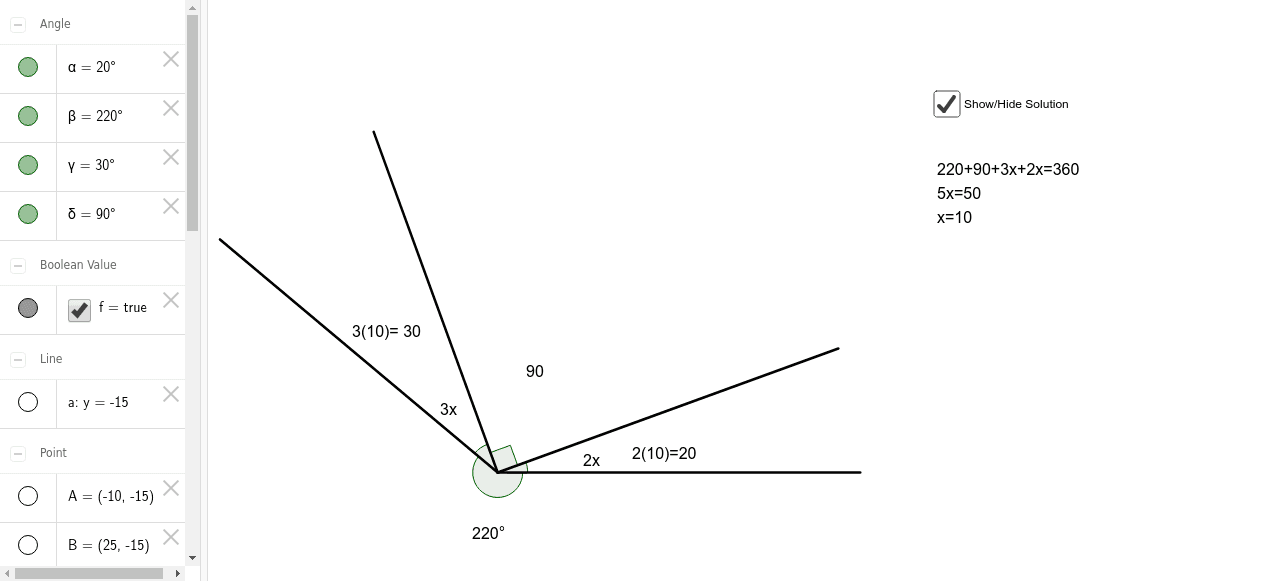
This GeoGebra example demonstrates a dynamic geometric construction involving rotation, angles, segments, and secant lines. The main phenomenon is a line rotating around point A intersecting a fixed figure, producing adjustable secants and multiple associated angles. Core mathematical concepts include rotation, angle measurement, secant lines, and segment relationships. The construction uses commands such as Line, Rotate, Angle, and Segment, creating objects A, B, a, B', α, b, B'_1, β, c, C, γ, d, B'', δ, e, along with seven text labels (text1 to text7) and line f. This interactive setup allows users to explore how rotation affects the secant lines and angle relationships. It is suitable for middle school geometry or high school analytic geometry classes, serving as a visual aid for teachers or a self-exploration tool for students to understand rotation transformations, secant properties, and the interdependence of angles and segments.
GeoGebra Commands & Parameters
Line(A, B) → aRotate(B, 20*°, A) → B'Angle(B, A, B') → αSegment(A, B') → bRotate(B, -220*°, A) → B'_1Angle(B'_1, A, B) → βSegment(A, B'_1) → cRotate(B'_1, -30*°, A) → CAngle(C, A, B'_1) → γSegment(C, A) → dRotate(B', 90*°, A) → B''Angle(B', A, B'') → δSegment(B, A) → e
AI Drawing Prompt Reference
Draw a line segment with one end fixed and the other rotating around a fixed point, showing the rotation path, angles formed during rotation, and segments, label these angles and segments. Also draw a line from the fixed point intersecting the rotation path to create adjustable secants and multiple related angles, exploring how rotation affects the secants and angle relationships.
The prompt above was compiled from the original drawing commands and is for reference only.