
棱柱与锥体体积对比演示
几何画板及绘图内容加载中,请稍等……
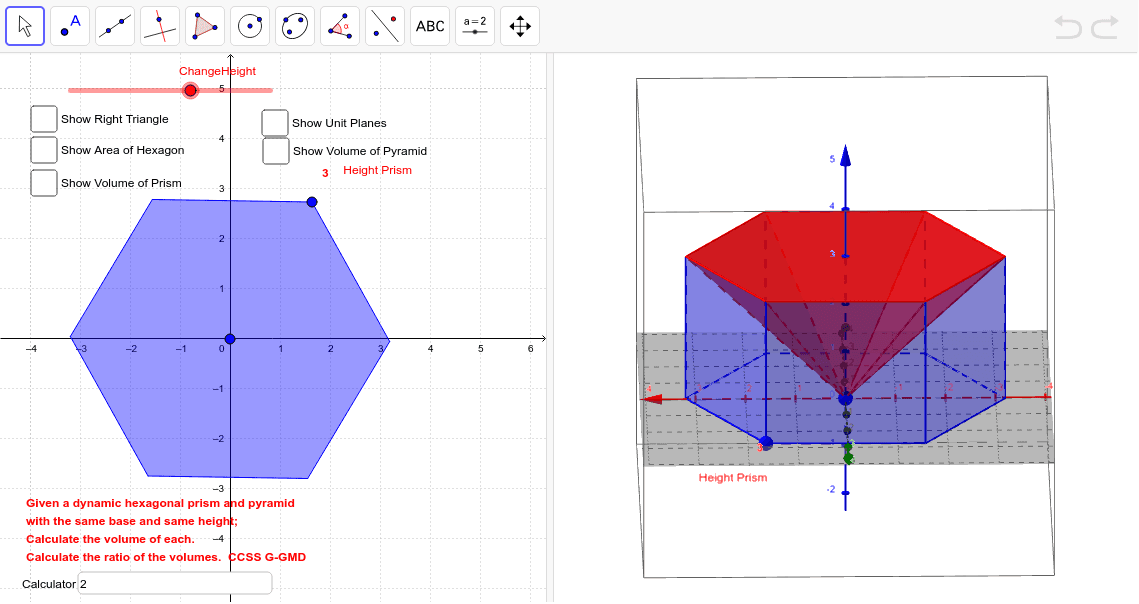
①本范例演示了底面积和高度相同的棱柱与锥体的体积对比现象;②涉及的核心数学概念包括体积公式、几何体特性、空间想象能力;③作图要点——从下方『构造摘要』提炼用到了Circle(圆)、Segment(线段)、Intersect(交点)、Polygon(多边形)、Plane(平面)、Mirror(镜像)、Prism(棱柱)、Pyramid(锥体)等GeoGebra命令/对象;④适合高中阶段学习立体几何的学生,用于直观理解体积计算公式的应用与对比。
GeoGebra 命令及参数
Circle(center, B, xOyPlane) → cSegment(center, B) → fCircle(B, f) → dIntersect(d, c) → C, D, ,Circle(D, f, xOyPlane) → eCircle(C, f, xOyPlane) → gIntersect(e, c) → E, F, ,Intersect(g, c) → G, H, ,Circle(G, f, xOyPlane) → hIntersect(h, c) → I, J, ,Polygon(B, D, F, I, G, C) → poly1, b, d_1, f_1, i, g_1, c_1Plane(L, A, K) → aMirror(poly1, a) → hexagonPrism(hexagon, B) → HexPrism, M, face6, face2, CrossSection, edge1, edge2, edge3, edge4, edge5, edge6, edgeBM, N, edgeMN, edgeNO, edgeOP, edgePQ, edgeBQ, O, P, Q, face1, face3, face4, face5PointIn(CrossSection) → PointfaceBMNOPQVolume(HexPrism) → volumejPoint(HexPrism) → PointjPointIn(CrossSection) → PointCrossSectionPointIn(hexagon) → Pointpoly1'Text(PrismHeight, (x(B) + 0.2, y(B) + 0.5)) → text1Plane(R, a) → jPlane(S, a) → kPlane(T, a) → lPlane(U, a) → mPlane(V, a) → nMidpoint(edgeBQ) → WSegment(center, W) → pAngle(B, W, center, xOyPlane) → αTextfield(calc) → CalculatorPyramid(hexagon, center) → Pyramid, face7, edge10, edge11, edge12, face9, face10, face11, face12, face8, edge7, edge8, edge9Volume(Pyramid) → volumePyraPoint(Pyramid) → PointPyraSegment(B, W) → q