
两集合文氏图
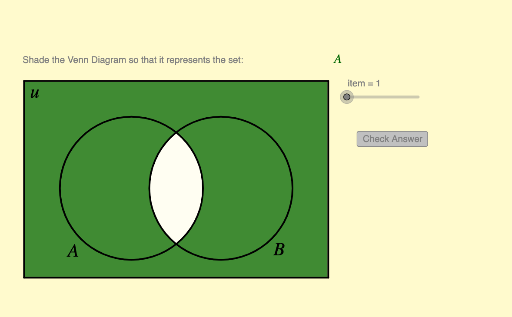
几何画板及绘图内容加载中,请稍等……
这个范例演示了两集合的文氏图。它展示了集合的基本概念,如并集、交集和补集。通过使用GeoGebra命令如Segment、If、Element等,可以动态地调整集合的元素,观察文氏图的变化。适合初中及以上学生学习集合论和逻辑关系。
GeoGebra 命令及参数
Segment((x_1, y_1), (x_1, y_2)) → eSegment((x_1, y_2), (x_2, y_2)) → fSegment((x_2, y_1), (x_2, y_2)) → gSegment((x_2, y_1), (x_1, y_1)) → hIf(IsGreen1, 0, 1) → RB1If(IsGreen1, 0.4, 1) → G1If(IsGreen2, 0, 1) → RB2If(IsGreen3, 0, 1) → RB3If(IsGreen4, 0, 1) → RB4If(IsGreen2, 0.4, 1) → G2If(IsGreen3, 0.4, 1) → G3If(IsGreen4, 0.4, 1) → G4Element(problem, item, 1) → textitemLength(problem) → iElement(problem, item, 2) → keyPolygon(Corner[1], Corner[2], Corner[3], Corner[4]) → poly1, l, m, n, qCorner(5) → G